AI Clerk Update: What Lawyers Can Now Do in One Chat (November 2026)
AI Clerk on eCourtsIndia got its biggest update yet: find a case in a few taps, start tracking from the chat, prepare for hearings, read orders and ask law questions, all in one conversation. Here is what changed, with sample chats and use cases.
Quick answer
AI Clerk is now the first screen of your eCourtsIndia dashboard, and one chat does most of a junior's daily desk work: it finds your cases in the court records by name, CNR or case number, starts tracking a case (and creates the client) from the chat, prepares you for a hearing with a timeline and a checklist, summarises the orders on file in date order, answers law questions from the statute book with the source, and pulls cause lists for a court and date.
We launched AI Clerk in June as a place to keep your clients, cases and files and ask questions about them (read the launch post). Since then more than 10,000 lawyers and litigants have asked it over 50,000 questions, and we studied those conversations closely: where people got stuck, what they asked for that the clerk could not yet do, and which answers they found useful.
The November 2026 update is the result. More than a hundred changes shipped between 3 and 18 November. This post walks through what is new, shows sample conversations of the kind lawyers now have every day, and is honest about what the clerk still cannot do.
On this page (14 sections)
- Watch: What's new in AI Clerk
- What changed in AI Clerk in November 2026?
- How do you find your case in AI Clerk?
- Can AI Clerk start tracking a case for you?
- How does AI Clerk help you prepare for a hearing?
- Can AI Clerk read and summarise court orders?
- Can you ask AI Clerk legal questions about a section?
- Does AI Clerk understand Hindi and Hinglish?
- What else can you do from the chat?
- Real use cases from the first weeks
- What can’t AI Clerk do yet?
- How much does AI Clerk cost?
- How do you start using the new AI Clerk?
- Frequently asked questions
Watch: What's new in AI Clerk
Read the video transcript
The AI Clerk on eCourtsIndia can now do a lot more. Here is what a lawyer can do in one chat. Your dashboard now opens on the clerk. It finds your cases, starts tracking from the chat, prepares you for hearings, reads orders, and answers law questions with sources. Tap Find my cases. The clerk searches the court records for your name, then asks one question at a time. Tap a state, and your case appears as a card. Tap Start Tracking. If you have no client yet, say whose case it is. The clerk creates the client, adds the case and turns tracking on. Before a hearing, ask the clerk to help you prepare. It tells you what is listed, draws the hearing history as a timeline, and lists what to have ready. It reads the orders on file and summarises them in date order, with what each order directed. It says plainly when an order is not on file. Ask a law question in plain words. The clerk looks up the section in the statute book, tells you if it is bailable, and shows the source. You can ask in Hindi or Hinglish too. The clerk answers in the same words you use. There is more. Cause lists by court and date, a refresh button for any case, briefs of all your tracked cases, file uploads, and a Legal Check on a person or company. Your first question can be on us, with a one time fifty rupee welcome credit. After that, a question costs about two to three rupees, and a full case brief eight to twenty. To start, sign in and open your dashboard. Tap Find my cases or type a CNR. Pick the chips to narrow down. Tap Start Tracking. Then ask anything about the case. Open the AI Clerk today at eCourtsIndia.com.
What changed in AI Clerk in November 2026?
AI Clerk moved from a per-client chat to one assistant for your whole practice, and it can now act, not only answer: it searches the court records, adds and tracks cases, reads orders and opens cause lists from inside the conversation.
| Area | Before | Now |
|---|---|---|
| Where it lives | Inside each client’s page | The first screen of your dashboard, across all clients, with a scope pill for one client |
| Getting started | An empty box | Starter prompts: Find my cases, Find a case by CNR or case number, Search by party name, What can AI Clerk do? |
| Finding a case | Outside the chat, on the Cases tab | In the chat, with narrowing chips for state, court and case type, and case cards that say which party matched |
| Adding and tracking | Map Case form | Start Tracking on any case card; the clerk creates the client if you have none |
| Hearings | Next date only | Hearing prep: what is listed, a hearing timeline, the last orders and what to have ready |
| Orders | Read one at a time | Summarised in date order with what each directed; gaps are called out |
| Law questions | General answers | Answered from the statute book with citation chips and sources |
| Suggestions | None | Opening chips from your own hearings and new orders, and follow-up chips after every reply |
| Fresh data | Refresh from the case page | A Refresh button under the answer, showing when the record was last updated |
A few smaller changes matter too: the clerk shows progress steps while it works, it runs on phones with the app’s mobile layout, you can attach files in any chat, and you can top up credits from a card inside the conversation when your balance runs low.
How do you find your case in AI Clerk?
Tap Find my cases, or type a CNR, a case number with its court, or a party name. The clerk searches the court records, asks one narrowing question at a time, and shows matching cases as cards you can open, summarise or track.
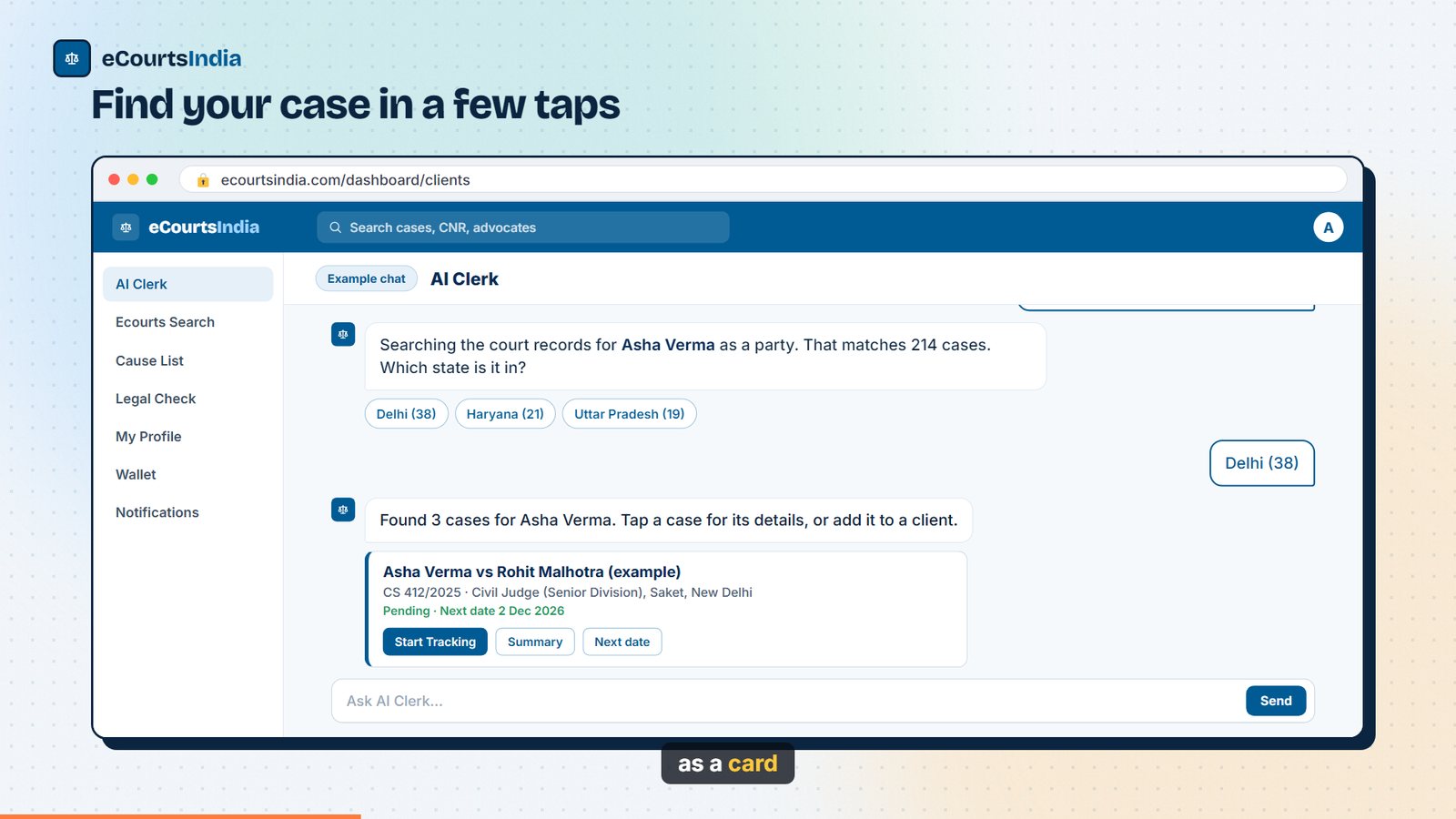
Most new users start here, so this flow got the most work. When you tap Find my cases, the clerk searches for the name on your account as a party. Common names match thousands of cases, so it asks which state, then which court or case type, and shows the count next to every option. You can tap a chip or type your answer, including a court name the list does not show.
You: Find my cases in the court records.
AI Clerk: Searching the court records for Asha Verma as a party. That matches 214 cases. Which state is it in? [Delhi (38)] [Haryana (21)] [Uttar Pradesh (19)]
You: Delhi (38)
AI Clerk: That matches 38 cases. Which court is it in, or what type of case is it?
You: Saket
AI Clerk: Found 3 cases for Asha Verma. Tap a case for its details, or add it to a client. [Case card: Asha Verma vs Rohit Malhotra, CS 412/2025, Civil Judge (Senior Division), Saket · Pending · Next date 2 Dec 2026 · Start Tracking · Summary · Next date]
The fastest route is still the CNR: paste the 16-character number and the case card comes back at once. If you type 17 characters, the clerk tells you one is extra instead of failing silently. Advocates with a verified profile can also ask Show my cases as an advocate, which searches by the name on their advocate profile.
Tips that save time
- Type the name the way the court writes it, for example with the father’s name or initials, if your account name is a nickname.
- Add the other party: “Ramesh Kumar vs State of Bihar” narrows far faster than a name alone.
- Name matches can be other people with the same name. Open the card and check the parties before you track a case.
Can AI Clerk start tracking a case for you?
Yes. Tap Start Tracking on a case card. If the case has no client yet, say whose case it is (or tap My own case) and the clerk creates the client, adds the case and turns on tracking.
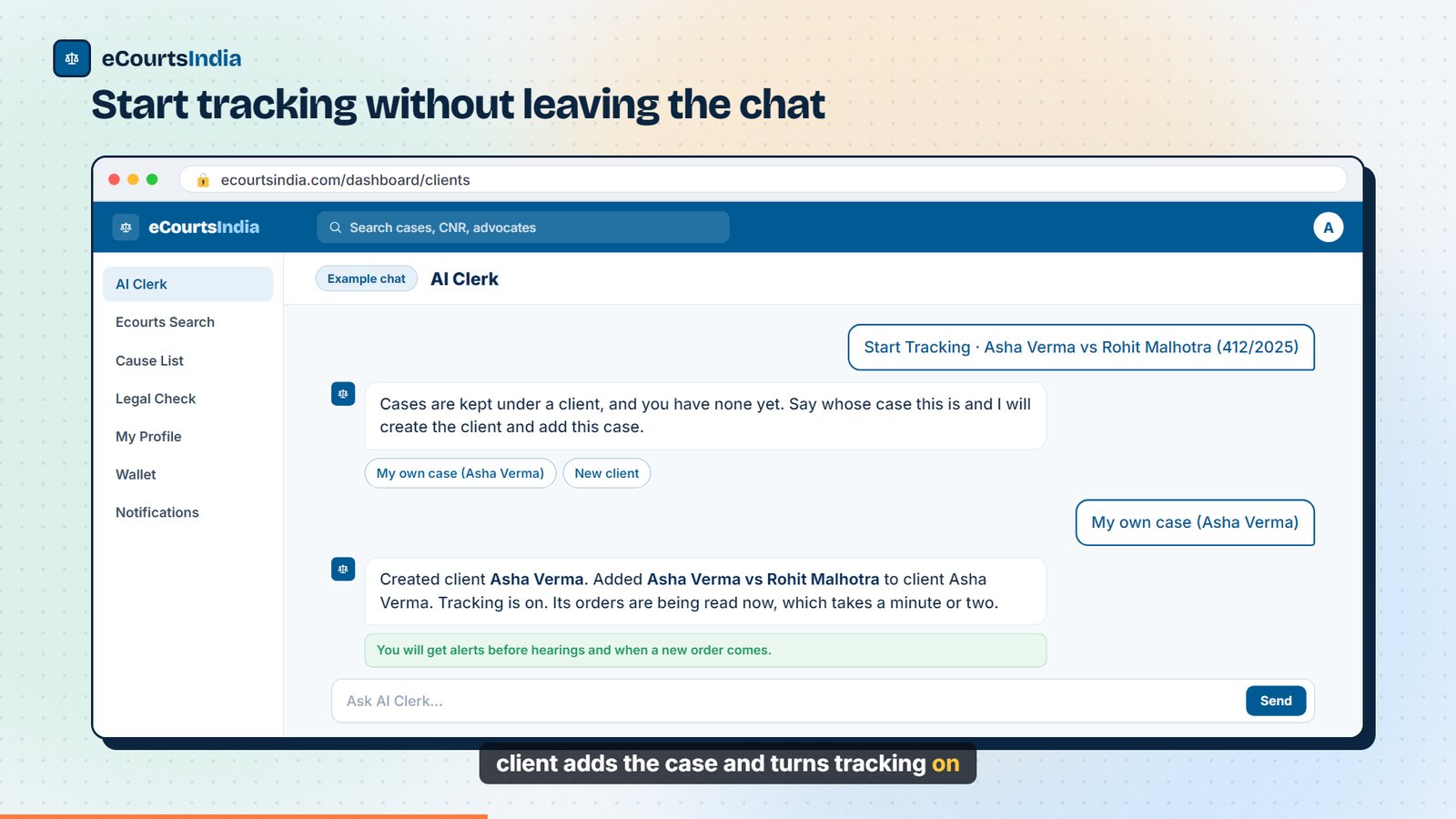
You: Start Tracking · Asha Verma vs Rohit Malhotra (412/2025)
AI Clerk: Cases are kept under a client, and you have none yet. Say whose case this is and I will create the client and add this case. [My own case (Asha Verma)] [New client]
You: My own case (Asha Verma)
AI Clerk: Created client Asha Verma. Added Asha Verma vs Rohit Malhotra to client Asha Verma. Tracking is on; the monthly tracking charge applies as on the cases page. Its orders are being read now, which takes a minute or two.
Tracking gives you alerts before hearings and when a new order comes, and lets the clerk read the case’s orders. Disposed cases and tribunal matters can still be added for reference; the clerk tells you when tracking is not available, and no tracking charge applies to them. If you already have dozens of cases in the government eCourts Services app, import them in bulk instead.
How does AI Clerk help you prepare for a hearing?
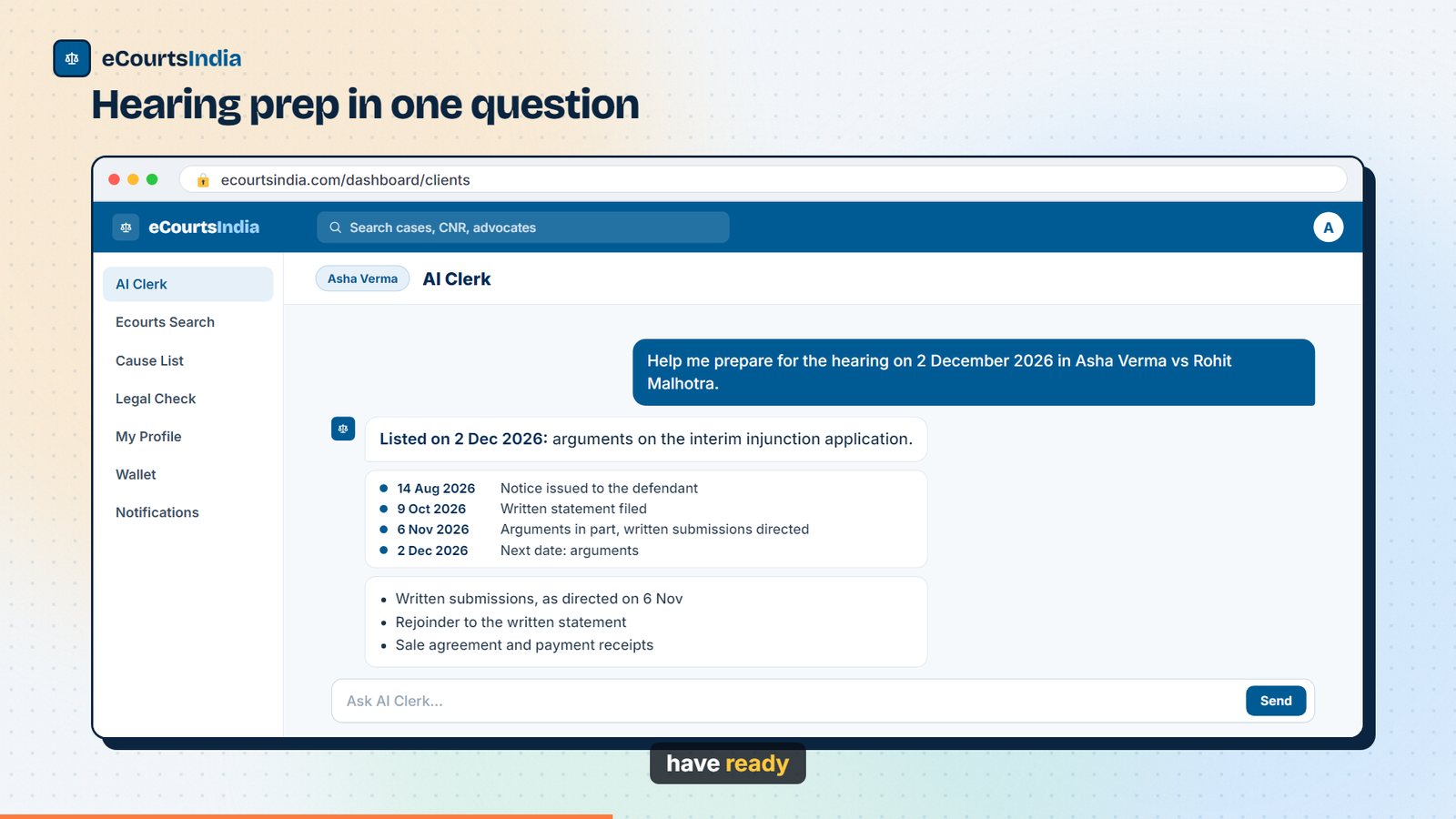
Ask it to help you prepare for a hearing, or tap the suggestion it shows for your next date. It tells you what is listed and why, draws the hearing history as a timeline, summarises the last orders, and lists what to have ready.
When you open the clerk, the first chips come from your own diary: What is listed on 2 Dec?, Help me prepare for the hearing on 2 December 2026 in …, or 3 new orders since you last looked. One tap sends the full question.
You: Help me prepare for the hearing on 2 December 2026 in Asha Verma vs Rohit Malhotra: what is listed, what the last orders directed, and what I should have ready.
AI Clerk: Listed on 2 Dec 2026: arguments on the interim injunction application.
Timeline: 14 Aug 2026, notice issued to the defendant · 9 Oct 2026, written statement filed · 6 Nov 2026, arguments heard in part, written submissions directed · 2 Dec 2026, next date, arguments.
What to have ready: written submissions, as directed on 6 Nov; your rejoinder to the written statement; the sale agreement and payment receipts.
Real answers follow the same shape. In a domestic violence matter before a Mahila Court, the clerk showed that every listing since August had been for the counter, flagged seven disposed miscellaneous petitions, and said plainly that the record did not show who filed the counter, so it should be checked against the court file. In a cheque-dishonour case where the user was the accused, it explained that the next date was for the service report on the summons and listed the papers to bring: the summons, a vakalatnama and the complaint, cheque, return memo and demand notice.
Briefs for a senior’s review
A chip on the opening screen, Brief each of my tracked cases, asks the clerk to write a note on every tracked case: parties, stage, last order, next date and what needs attention. Lawyers use it before a weekly review with a senior. For a sessions case with no order on file, the clerk listed the statutory exposure from the sections on record, showed that the last listings were all for the chargesheet before the case was marked disposed, and asked the lawyer to upload the disposal order, because any remedy depends on its wording.
Can AI Clerk read and summarise court orders?
Yes. Ask it to summarise the orders on file and it reads each order and lists them in date order with what each directed. When an order for a hearing is not on file, it says so instead of guessing.
You: Summarise the court orders on file in CS 412/2025, in date order, and say what each directed.
AI Clerk: Two orders are on file. 14 Aug 2026: notice issued to the defendant, returnable on 9 Oct 2026. 6 Nov 2026: the injunction application was heard in part; both sides to file written submissions within two weeks. No order is on file for the 9 Oct hearing, so I can’t say what was directed that day. [What is listed on 2 Dec?] [Refresh this case]
This works for orders the court published as readable text. Scanned or badly encoded orders may be partly unreadable, and the clerk tells you when that happens. For a case you have not added, the clerk can still open its hearing history and the list of orders, and offers to add it so it can read them. To read a single order yourself, the case page has an AI summary and a true-copy download.
Can you ask AI Clerk legal questions about a section?
Yes. Ask about any section of the BNS, BNSS, BSA, IPC, CrPC, CPC or other Central Acts in plain words. The clerk looks up the text in the statute book before it answers, marks each section as a citation chip, and lists its sources.
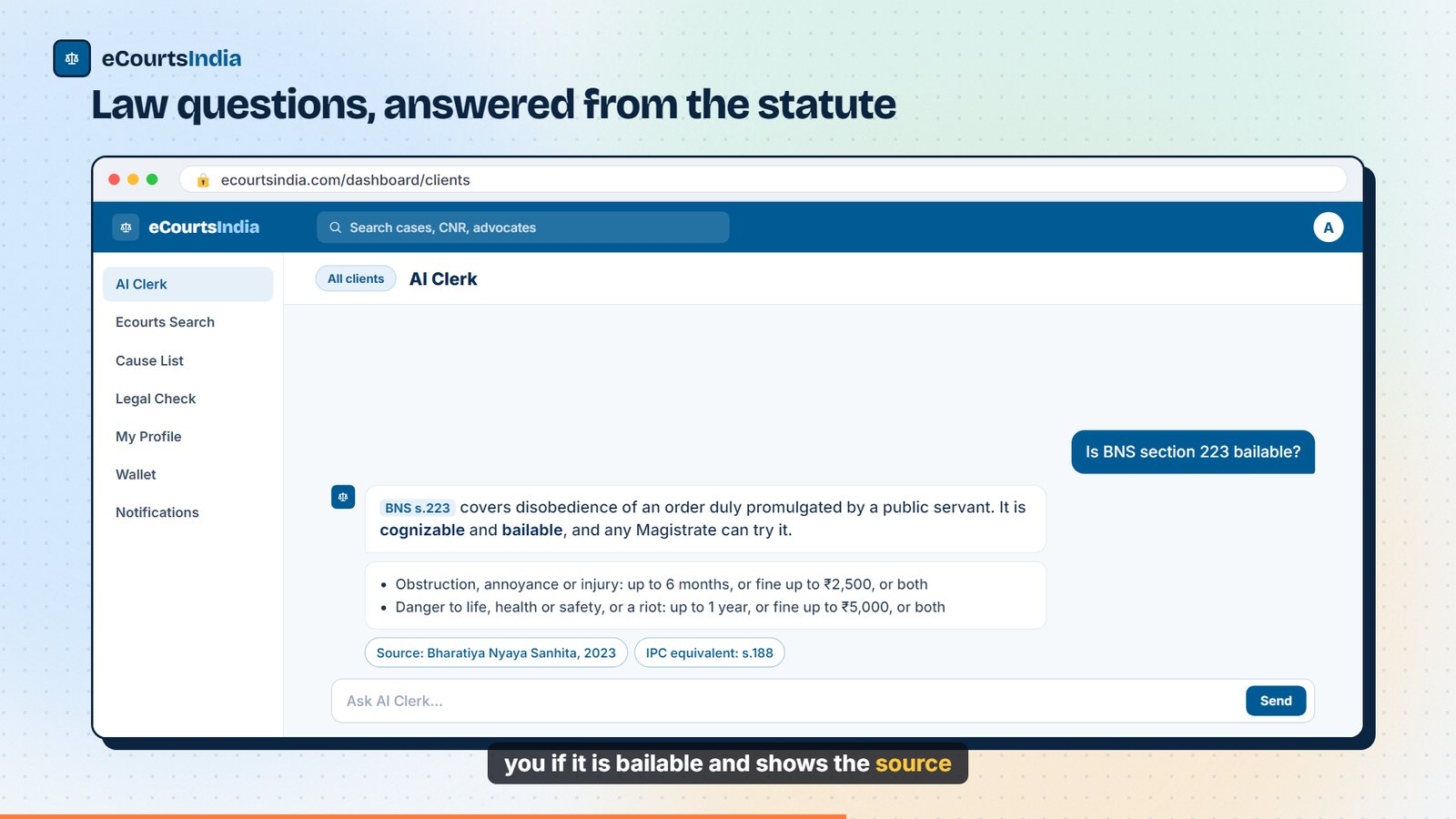
You: Is BNS section 223 bailable?
AI Clerk: BNS s.223 covers disobedience of an order duly promulgated by a public servant. It is cognizable and bailable, and any Magistrate can try it. Where the disobedience causes obstruction, annoyance or injury, the punishment is up to 6 months, or a fine up to ₹2,500, or both. Where it causes danger to life, health or safety, or a riot, it is up to 1 year, or a fine up to ₹5,000, or both. It corresponds to IPC s.188. Sources: Bharatiya Nyaya Sanhita, 2023.
This matters because the BNS renumbered almost every offence, so a remembered IPC number is usually wrong under the new law. The clerk also knows which case is open: asked What charges and sections apply here? on an NDPS matter, it read sections 8(c) and 22(b) from the record, explained each, and said that the record did not show the substance or quantity, which decides the punishment. For the full method, see how to check if a BNS offence is bailable.
Does AI Clerk understand Hindi and Hinglish?
Yes. Write in Hindi or Hinglish and the clerk answers in the same style, with case names, dates and sections kept exact.
You: Yeh case kis baare mein hai aur agli tareekh kab hai?
AI Clerk: Yeh Asha Verma vs Rohit Malhotra ka civil suit hai, Saket ke Civil Judge ke saamne. Asha Verma ne sale agreement par injunction maanga hai. Agli tareekh 2 December 2026 hai, arguments ke liye.
Families tracking a relative’s case use this most. In one real chat, a user asked in Hinglish when a friend held by the cyber police would be released. The clerk explained default bail in plain words, declined to guess which of thousands of same-name cases was the friend’s, and listed the details to bring (police station, FIR number, court) so it could find the right case.
What else can you do from the chat?
Pull a cause list for a court and date, refresh a case from the court, upload and ask about your own files, find similar cases, and hand off a background check to Legal Check, all without leaving the conversation.
- Cause lists. Ask What is listed in Family Court Pune on 21 November? or search a party or advocate across a court for up to 7 days. A card opens the court’s full cause list. Cause lists are published mostly for district and taluka courts; see the cause list guide.
- Refresh. When a next date has passed, the answer carries a Refresh button that fetches the latest record from the court in a few minutes and shows when it was last updated. Disposed cases show greyed, with Refresh anyway.
- Which cases are pending? After a search, ask Which of these 9 cases are still pending? and the clerk sorts them, with each one’s next date.
- Your own files. Upload a plaint, a reply or a notice (PDF, JPG, PNG or DOCX, up to 50 MB each) and ask about it. If a draft needs documents you have not uploaded, the clerk asks for them rather than inventing facts.
- Similar cases. Ask for similar cases before the same court and get plain-word insights, with the anchor case kept out of the figures.
- Legal Check. Asking about a person or company’s court record brings up a card that opens a prefilled Legal Check.
- Client notes. Notes you write on a client are read by the clerk, so it knows, for example, which side you act for.
Real use cases from the first weeks
Six patterns account for most of the useful conversations we reviewed. Names and details below are changed.
- The litigant who only knows their own name. A borrower facing a cheque-bounce complaint typed nothing but Find my cases, picked the state and court from the chips, found the case, started tracking it as My own case, and asked what the next date was for. Four taps and two questions.
- The Monday review. An advocate with three tracked NI Act matters asked for a brief of each for a senior’s review. The clerk grouped the two cases with identical histories, flagged the one where the client was the accused and process had not issued, and said a refresh was not worth running before the next date.
- The day-before check. A lawyer asked what was listed on 1 December across three entries. The clerk noticed all three had the same CNR, answered once, searched the published cause list for that date, and noted that the record’s last-hearing field looked stale.
- The statute check before drafting. Lawyers ask ipc188 or what are the charges and sections here and get the section text, its BNS equivalent and its classification, with a warning when the record and the statute disagree.
- The relative’s case, in Hinglish. Family members ask what a case is about and when the next date is, and get the answer in the language they wrote in.
- The office that tracks a whole docket. Chambers paste a case number with its court, check the next date and purpose, and add the case to the right client in one go.
What can’t AI Clerk do yet?
It cannot see orders the court has not published, it does not search by FIR number, its cause lists cover mostly district and taluka courts, and a name search can match other people with the same name.
- Unpublished orders. If no order is on the court record, the clerk can only show the listing purposes. It says so and suggests a refresh after the next date.
- FIR numbers. Search the case by CNR, case number with court, or party names. FIR documents are on the FIR records pages.
- High Court cause lists. Many High Court daily lists are not in our cause list data yet, and no court publishes exact listing times. The court’s own list is final.
- Same-name matches. A search on a common name returns other people’s cases too. Check the parties on the card, and confirm with the client, before tracking.
- Legal advice. The clerk organises the record and the law; strategy and court submissions stay with you.
How much does AI Clerk cost?
At the time of writing (November 2026), your first unpaid question unlocks a one-time ₹50 AI Clerk welcome credit. After that a question costs about ₹2 to ₹3, a full case brief ₹8 to ₹20, and tracking a case ₹5 per case per 30 days. Searches, cause lists and directories are free within the daily limits.
Charges come from your wallet; 1 credit is ₹1. When the balance runs out, a card in the chat lets you buy credits or a plan without leaving the conversation. Questions about billing itself are free. The Chrome Extension adds ₹100 to your wallet every month while it is active. Current prices are always on the pricing page.
How do you start using the new AI Clerk?
Sign in at ecourtsindia.com and open your dashboard; AI Clerk is the first screen. Tap a starter prompt or type a CNR, narrow with the chips, tap Start Tracking, then ask anything about the case.
Step 1: Open your dashboard
Go to ecourtsindia.com/dashboard and sign in. The page opens on AI Clerk with the message box and four starter prompts. For a tour of every tab, see the dashboard guide.
Step 2: Find your case
Tap Find my cases, or type a CNR, a case number with its court and year (for example “CS 412/2025 Saket”), or the parties’ names.
Step 3: Narrow it down
Tap the state, then the court or case type. Each chip shows how many cases it leaves.
Step 4: Start tracking
Tap Start Tracking on the right case card and say whose case it is. The clerk creates the client and adds the case.
Step 5: Ask
Ask for hearing prep, an order summary, the next date and purpose, or a brief for your senior. Use the follow-up chips under each answer for the next step.
AI Clerk keeps changing every week, and most of the changes start from what you type into it. If an answer is wrong or a flow dead-ends, tell us through Get help in the user menu. Open your dashboard and ask it about your next hearing.
Sources: eCourtsIndia product changes shipped 3 to 18 November 2026; anonymised review of AI Clerk conversations; Bharatiya Nyaya Sanhita, 2023 (s.223 and First Schedule classification); eCourtsIndia pricing, November 2026.
Frequently asked questions
What is AI Clerk on eCourtsIndia?
AI Clerk is the chat assistant on the eCourtsIndia dashboard for lawyers and litigants. It finds cases in Indian court records, tracks them, prepares you for hearings, summarises orders and answers law questions from the statute book. It works across all your clients from one chat.
How do I find my court case in AI Clerk?
Open your dashboard, tap Find my cases or type a CNR, a case number with its court, or the parties' names. The clerk asks for the state, court or case type when there are many matches and shows the case as a card. From the card you can see a summary, the next date, or start tracking.
Can AI Clerk add a case to a client for me?
Yes. Tap Start Tracking on a case card. If you have no client for it, say whose case it is or tap My own case, and the clerk creates the client, adds the case and turns tracking on. Tracking costs ₹5 per case per 30 days at the time of writing (November 2026).
Does AI Clerk read court orders?
Yes, for orders the court has published. Ask it to summarise the orders on file and it lists them in date order with what each directed. If an order for a hearing is not on file, it says so and does not guess what was directed.
Can AI Clerk tell me if a BNS offence is bailable?
Yes. Ask in plain words, for example Is BNS section 223 bailable. The clerk looks up the section and its First Schedule classification before answering and shows the source. It also gives the IPC equivalent where one exists.
Does AI Clerk work in Hindi?
Yes. You can write in Hindi or Hinglish and the clerk replies in the same style. Case names, dates and section numbers are kept exactly as in the court record.
How much does AI Clerk cost?
At the time of writing (November 2026), a one-time ₹50 welcome credit covers your first questions. After that a question costs about ₹2 to ₹3 and a full case brief ₹8 to ₹20, charged from your wallet. Searches and cause lists are free within the daily limits.
Update log: 19 November 2026. eCourtsIndia (ecourtsindia.com) is an independent, non-government platform that organises public court records. The sample chats below use fictional names and are shortened for reading; real answers come from the court record of your own cases.
Related guides
GuideHow-To Guides
How to Pause, Resume or Delete a New Case Alert (and How Billing Works)
How to manage your New Case Alerts on eCourtsIndia: read the alerts list, pause, resume or delete an alert, and understand the ₹20 monthly billing, low-balance pauses and wallet entries.
GuideHow-To Guides
How to Pick the Right Name for a New Case Alert (and Read the Preview)
A new case alert is only as good as its name. Here is how core words are matched, how to read the free preview and the too-broad warning, and how to narrow an alert with courts, state and district.
GuideHow-To Guides
How to Set Up a New Case Alert on eCourtsIndia (Step by Step)
A step-by-step guide to creating a New Case Alert on eCourtsIndia: type a party name, choose courts and filters, read the preview, and get a daily digest of newly registered cases that name them.