Introducing New Case Alerts: Know When a New Court Case Names You
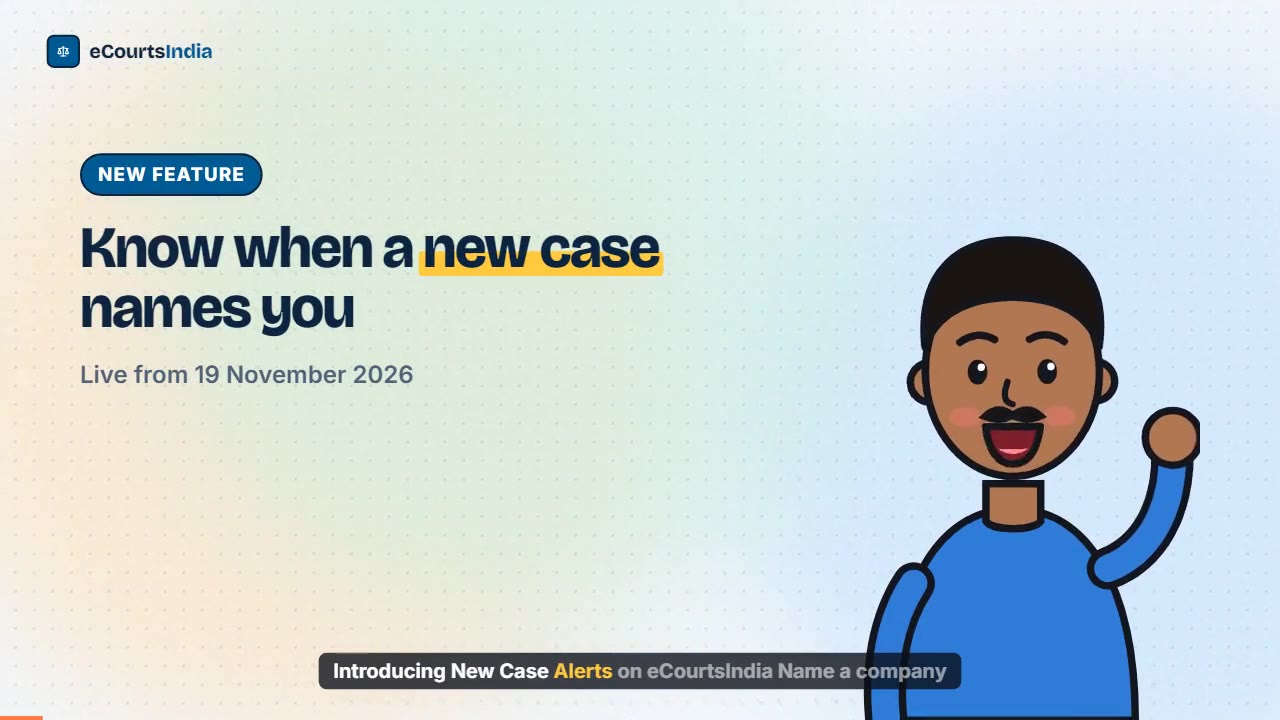
New Case Alerts, live on eCourtsIndia from 19 November 2026, watch a company or person name and send you the newly registered court cases that name them, each day.
Quick answer
New Case Alerts, launched on eCourtsIndia on 19 November 2026, watch a company or person name for you. Each day you get the newly registered court cases that name that party, on either side, by email and on any other alert channels you have turned on. You set one up in four steps from your dashboard, a free preview shows how many recent cases match, and each alert costs ₹20 a month.
Most people learn about a new court case against them late. A summons takes time to arrive, a notice goes to an old office address, or a client mentions the matter after the first date has gone by. Until now, the only way to know sooner was to search your own name on court portals again and again. New Case Alerts does that searching for you, every day, across the courts eCourtsIndia covers.
This post explains what the feature does, why we built it, how it matches names, where the alerts arrive, what it costs, and how it differs from the case alerts you may already use.
On this page (11 sections)
- Watch: Introducing New Case Alerts on eCourtsIndia
- What is New Case Alerts?
- Why did we build New Case Alerts?
- How do New Case Alerts work?
- How does name matching work?
- Where do new case alerts arrive?
- How much does a new case alert cost?
- How is a new case alert different from case tracking?
- Who is New Case Alerts for?
- What does New Case Alerts not do?
- Frequently asked questions
Watch: Introducing New Case Alerts on eCourtsIndia
Read the video transcript
Introducing New Case Alerts on eCourtsIndia. Name a company or person, and hear when a new case names them. Too often, people hear about a new case late, after a date has gone by. Open New Case Alerts. Type the party name, keep the courts you need, and pick a state if you like. A free preview counts recent matches and shows examples. Click Create alert. It costs rupees 20 a month. Each day, from about 7 AM, one digest arrives by email, and on WhatsApp if it is on. Open the alert to see every case caught. Then track a case to follow its hearings. New Case Alerts watch a name, start from today, and cover four kinds of court. Set up your first alert at eCourtsIndia.com.
What is New Case Alerts?
New Case Alerts is a dashboard feature that watches a party name, not a case number. Each day it sends you the court cases newly registered that name that company or person, on the petitioner or the respondent side.
The dashboard sums it up in one line: “Name a company or person. Each day we send you the newly registered cases that name them, by email and on any other alert channels you have turned on.” You type a name such as “Sunrise Agro Foods Pvt Ltd” (an example), choose which kinds of court to watch, and the alert runs every day after that. When a new case names the party, it reaches your inbox, and it is listed on the alert’s own page with the court, the side the party is on, the CNR and the registration date.
“New” has a precise meaning here. It is a case that eCourtsIndia’s data harvesters have newly picked up and whose registration date falls within the last 60 days. It is not a search of old cases. For the full litigation history of a name, run a one-time search instead, as our guide on finding all cases against a company explains.
Why did we build New Case Alerts?
Because finding out late about a new case is costly, and checking for one by hand every day is not practical.
Lawyers and businesses told us the same story many times. A recovery suit, a cheque bounce complaint or a consumer case is filed against a company. The papers go to an old address, or sit with a branch office, and the legal team hears about it weeks later. By then a date may have passed. Law firms told us a version of the same story about their clients: they learn of the new matter when the client calls in a hurry.
The information was public all along. The case was registered on the court’s own system. What was missing was someone looking for that name every day across thousands of courts. eCourtsIndia’s data harvesters already bring in court records for case tracking, so watching those new records for a name was a natural next step. A new case alert can tell you about a new matter as soon as it reaches eCourtsIndia, which can be before a summons reaches you.
How do New Case Alerts work?
You set one up in four steps: open New Case Alerts, type the party name, choose the courts, then read the free preview and click Create alert. Our step-by-step guide on how to set up a new case alert covers each screen in more detail.
Step 1: Open New Case Alerts in your dashboard
Log in at ecourtsindia.com and pick New Case Alerts in the left sidebar, or go straight to ecourtsindia.com/dashboard/new-case-alerts. If this is your first alert you will see “No alerts yet. Set up your first one below.” Otherwise, click New alert. If you do not have an account yet, create one first.
Step 2: Type the party name
In Party name, type the company or person you want to watch, for example “Sunrise Agro Foods Pvt Ltd” or “Asha Verma” (both examples). The help text states the rule: “A company or person. We match new cases that name them on either side.” Once the preview answers, a line shows exactly which words will be looked for, such as We’ll look for: “SUNRISE AGRO FOODS”.
Step 3: Choose the courts, and a state if you want one
Under Courts, four boxes are ticked by default: Supreme Court (all India), Tribunals (all India), High Courts and District Courts. Untick what you do not need. When High Courts or District Courts is ticked, a State dropdown appears (default “Any state”). With District Courts ticked and a state chosen, a District dropdown appears too. The state filter includes the High Court that serves that state, so Haryana includes the Punjab and Haryana High Court.
Step 4: Read the preview, then click Create alert
A free preview counts recent matches, for example “~42 cases in the last 60 days (0.7 a day). Approx.”, and lists up to five Recent examples with the parties and the registration date. These examples help you judge whether the name is right; they are not sent to you. The cost line reads “Cost: ₹20/month · Balance ₹…” with your balance. Click Create alert and you see “Alert created” and “₹20 charged”. Pressing Enter in the name box does not create the alert, so nothing is charged by accident.
How does name matching work?
Your name is cut down to its core words, and a case matches when all of those words appear in one party name, on either side, in any order.
- Noise words are dropped. M/s, The, Pvt, Private, Ltd, Limited, LLP, Co, Company, Corp, Inc and similar words are ignored, so “M/s. Sunrise Agro Foods Pvt Ltd” and “sunrise agro foods” are the same alert.
- All core words, one party. “Sunrise Agro Foods” matches a party recorded as “Sunrise Agro Foods Private Limited through its Director”, because extra words in the party name are fine. It does not match a case where the words are split across two different parties.
- Initials are joined. “K.R.S. Logistics” is read as “KRS Logistics”, and Co-operative and Co-op spellings are treated alike.
- Both sides are checked. Each match records whether the party was the Petitioner or the Respondent.
Matching uses names as the court recorded them. If the court spelt a name differently and one of your core words is missing, that case will not match, which is why a former name or a well-known brand deserves its own alert. Cases taken down from eCourtsIndia after a removal request are never included. For more on choosing the words, read how to pick the right name for a new case alert.
Where do new case alerts arrive?
Each alert sends one digest a day, from about 7 AM IST, by email, and also on WhatsApp and in the eCourtsIndia app if you have those turned on.
A digest covers the new matches since the previous one. Up to 50 cases are listed; if there are more, the rest are counted. WhatsApp delivery follows the WhatsApp notifications switch under Notification Preferences in Settings. On a phone with the eCourtsIndia app installed and notifications allowed, you also get an app notification. Every digest is kept in your dashboard Notifications as well. A WhatsApp digest reads like this (example):
New case alert: 2 new cases were registered naming Sunrise Agro Foods. Latest: Sunrise Agro Foods Pvt Ltd, District Court, Central (Delhi), registered 17 Nov 2026. See all of them in New Case Alerts on eCourtsIndia.
The message carries a button that opens New Case Alerts, where each alert has a page listing every case it has caught, newest first, with a link to the case page.
How much does a new case alert cost?
At the time of writing (November 2026), each alert costs ₹20 a month (20 credits), charged from your wallet when you create it and then every month while it is on. Digests are included in that price: unlike case tracking alerts, there is no per-message charge.
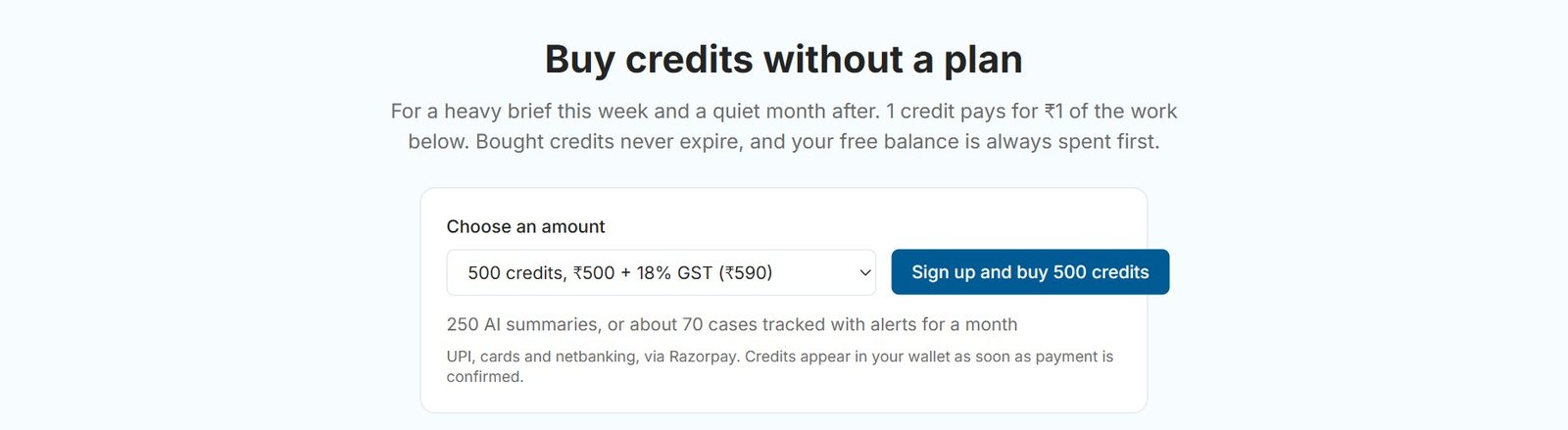
The small print on the form says: “Charged now for the first month, then every month while the alert is on. Pause or delete it any time; the rest of a month is not refunded.” The charge appears in your wallet’s Transaction History as “New case alert”. If your balance is short, the form tells you by how much and the button changes to Add credits, which takes you to the pricing page and brings you back. Previews never cost anything and do not use your free searches.
If the wallet cannot pay a monthly renewal, the alert shows “Paused: low balance” and you get an email; adding credits resumes it automatically. For how credits, plans and top-ups work, see eCourtsIndia Wallet, Credits and Plans. For pausing, resuming and renewals, see how to manage new case alerts.
How is a new case alert different from case tracking?
Case tracking follows a case you already know, by its CNR. A new case alert watches a name and tells you about a case you did not know existed.
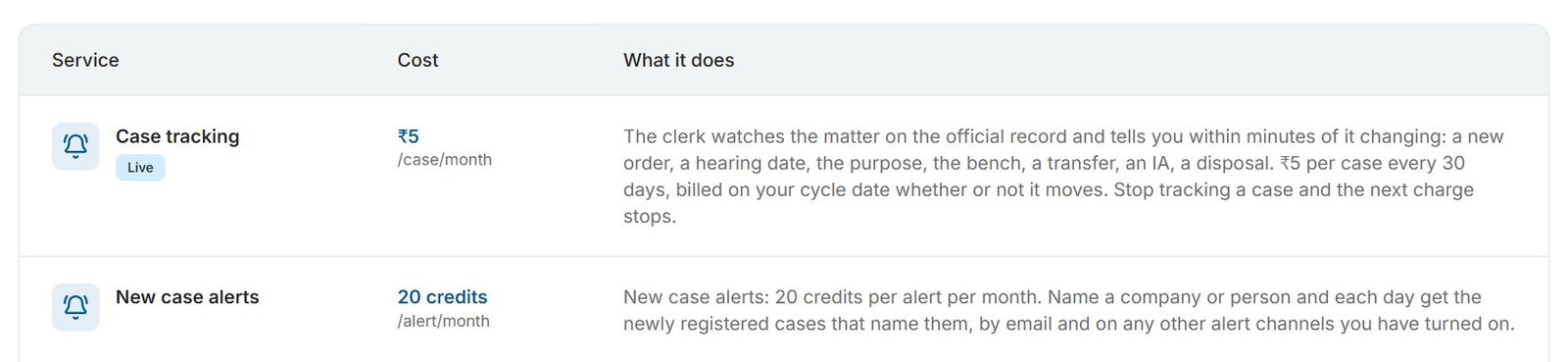
| New case alert | Case tracking | |
|---|---|---|
| Watches | A company or person name | One case, by its CNR |
| Tells you | A new case naming that party has been registered | New orders, hearing dates and status changes on that case |
| Delivery | One digest a day per alert | An alert for each update |
| Price (November 2026) | ₹20 per alert per month, digests included | ₹5 per case per 30 days, plus ₹0.50 per delivered alert per channel |
| Where you set it up | New Case Alerts in the dashboard | Enable alerts on the case page |
The two work best together. When a new case alert catches a matter, open it from the alert’s page and track it, so every hearing and order reaches you from then on. Our guide to enabling case alerts shows how.
Who is New Case Alerts for?
Anyone who needs to know when a new case names a particular company or person: in-house legal teams, law firms, lenders, procurement teams, landlords and individuals.
- Companies and in-house legal teams watch the company, its subsidiaries and its brands for new suits, cheque bounce complaints, consumer cases, labour matters and writs.
- Law firms watch their clients’ names so they can help fast, and watch the opposing parties in a client’s dispute.
- Lenders, NBFCs and collections teams watch borrowers and guarantors for new cases.
- Procurement and HR teams keep watching a vendor or partner after a one-time LegalCheck at onboarding.
- Individuals and landlords watch their own name, a family business, or a tenant.
Our companion post, 7 ways to use New Case Alerts, gives a suggested setup and a budget for each of these.
What does New Case Alerts not do?
It does not search the past, it cannot promise to catch every case, and it is not available through the API.
- No backlog. An alert starts when you create it. The preview shows recent cases so you can judge the volume, but those cases are not sent to you.
- Only the cases we see. It reports newly registered cases that our data harvesters pick up from the courts eCourtsIndia covers. It cannot report a case before the court registers it, and a name the court spelt differently may not match.
- No public API. New case alerts are set up in the dashboard. There is no Partner API endpoint for them.
- One state per alert. From the form, one alert takes one state and at most one district. To watch two states, create two alerts.
Getting started takes a couple of minutes. Log in, open New Case Alerts, type the name you would least like to be surprised by, and let the free preview tell you whether it is specific enough. If you are new to eCourtsIndia, the eCourtsIndia user guide is a good place to begin. Then set up your first alert at ecourtsindia.com/dashboard/new-case-alerts.
Sources: eCourtsIndia pricing page (new case alert and case tracking prices, November 2026); the New Case Alerts screen in the eCourtsIndia dashboard, November 2026.
Frequently asked questions
What are New Case Alerts on eCourtsIndia?
New Case Alerts is an eCourtsIndia feature, launched on 19 November 2026, that watches a company or person name. Each day it sends you the newly registered court cases that name that party, on either side, by email and on WhatsApp or the app if you have turned those on. It looks for new cases only, not old ones.
How much does a new case alert cost?
As of November 2026, each new case alert costs ₹20 (20 credits) a month from your eCourtsIndia wallet. The first month is charged when you create the alert, and it renews monthly while it is on. The daily digests are included, and the preview you see before creating an alert is free.
Will a new case alert show me old cases against a company?
No. A new case alert starts from the moment you create it and reports cases that eCourtsIndia newly picks up after that. The free preview shows matches from the last 60 days to help you judge the name, but those cases are not delivered. To find older cases, search the party name on eCourtsIndia.
How is a new case alert different from a case alert?
A case alert follows one case you already know, by its CNR, and tells you about new orders, hearing dates and status changes. A new case alert watches a company or person name and tells you when a new case naming them is registered. Many users run both: the new case alert finds the case, then they track it.
Which courts do new case alerts cover?
You can choose the Supreme Court, tribunals, High Courts and district courts; all four are ticked by default. High Courts and district courts can be narrowed to one state, and district courts to one district. The Supreme Court and tribunals are always watched all India.
Does a new case alert catch every case filed against me?
No service can promise that. A new case alert reports newly registered cases that eCourtsIndia’s data harvesters see, where all the core words of your name appear in one party name. A case recorded under a different spelling may not match, so create a second alert for a known variant or former name.
Can I set up new case alerts through the eCourtsIndia API?
No. New case alerts are set up in the eCourtsIndia dashboard at ecourtsindia.com/dashboard/new-case-alerts, and there is no Partner API endpoint for them. The Partner API covers search, case details, cause lists and LegalCheck.
Update log: November 2026. eCourtsIndia (ecourtsindia.com) is an independent, non-government platform that mirrors public court records; it is not affiliated with any court or with the government.
Related guides
UpdateAI & Legal Technology
AI Clerk Update: What Lawyers Can Now Do in One Chat (November 2026)
AI Clerk on eCourtsIndia got its biggest update yet: find a case in a few taps, start tracking from the chat, prepare for hearings, read orders and ask law questions, all in one conversation. Here is what changed, with sample chats and use cases.

GuideAI & Legal Technology
Your Advocate Profile on eCourtsIndia Is Free, and It Always Will Be
List a free, Bar Card verified advocate profile on eCourtsIndia so clients find you by bar council, practice area and court. No fees, no paid ranking.

APIAI & Legal Technology
One Advocate, Nine Courts, One Claude Window: Running a Litigation Practice on the eCourtsIndia MCP
A weekly routine for advocates: use Claude and the eCourtsIndia MCP to see what is listed, which orders came in and which matters stalled, in one window.