How to Pick the Right Name for a New Case Alert (and Read the Preview)
A new case alert is only as good as its name. Here is how core words are matched, how to read the free preview and the too-broad warning, and how to narrow an alert with courts, state and district.
Quick answer
Type the distinctive part of the name, then read the preview before you pay. The form drops noise words like M/s, Pvt and Ltd, shows the core words it will look for, and counts how many recent cases match, with a few recent examples. If it warns that the name is too broad, add more of the name or narrow the alert by court, state or district.
A new case alert is only as good as the name behind it. Too short, and your inbox fills with strangers who share a surname. Too long, and a case the court recorded slightly differently slips past. The New Case Alerts form gives you two tools to get this right before you spend anything: a line that shows exactly which words it will look for, and a free preview of recent matches.
This guide explains both, then covers filters, people versus companies, name variants and a table of worked examples. If you have not set up an alert before, start with how to set up a new case alert. All names here are fictional.
On this page (11 sections)
- Watch: Pick the right name for a new case alert
- What does a new case alert actually look for?
- How does a case match your name?
- How do you read the preview?
- What does the too-broad warning mean?
- How do courts, state and district narrow an alert?
- Should you set up a person differently from a company?
- What about name variants and former names?
- What do good and weak alert names look like?
- Why is my alert not catching what I expected?
- Frequently asked questions
Watch: Pick the right name for a new case alert
Read the video transcript
The name you type decides how useful a new case alert is. Here is how to pick it. Type the name as you know it. Words like Private and Limited are dropped, and the form shows what we'll look for. A case matches when all your core words appear in one party name, in any order. Extra words are fine, and initials are joined. Too short or too busy, and you get an amber warning. Narrow it before you click Create anyway. For a person, use the full name, then add a state and district. The count drops. For a former name or a brand, create a second alert. Preview examples are never sent to you. Test a name with the free preview at eCourtsIndia.com.
What does a new case alert actually look for?
It looks for the core words of the name you type: the name in capitals, with punctuation removed and common noise words dropped.
The noise words are M/S, MS, THE, PVT, PRIVATE, LTD, LIMITED, LLP, CO, COMPANY, CORP, CORPORATION, INC, PLC, AND and “(P)”. Relation markers such as S/o, W/o, D/o, C/o and R/o are ignored too. Initials are joined, so “K.R.S. Logistics” is read as “KRS Logistics”, and Co-operative and Co-op spellings are treated alike.
You do not have to guess the result. Once the preview answers, the help line under Party name shows it. Type “M/s. Sunrise Agro Foods Pvt Ltd” and it reads We’ll look for: “SUNRISE AGRO FOODS”. If you type only noise words, the form says “Add the company or person name, not just Pvt Ltd”. A name must be under 200 characters.
Because of this, “Sunrise Agro Foods Pvt Ltd” and “sunrise agro foods” are the same alert. If you try to create it twice with the same filters, you see “You already have an alert for this name with these filters”.
How does a case match your name?
A case matches when all of your core words appear in one party name, in any order, on the petitioner or the respondent side.
Take the alert “Sunrise Agro Foods”:
- Matches: a party recorded as “Sunrise Agro Foods Private Limited through its Director”. Extra words in the party name are fine.
- Matches: a party recorded as “Agro Foods Sunrise”. Order does not matter.
- Does not match: “Sunrise Foods”, because AGRO is missing.
- Does not match: “Sun Rise Agro Foods”, because the court’s spelling has no SUNRISE in it.
The petitioner side is checked first, and each match records the side: Petitioner or Respondent. Matching always uses the name as the court recorded it, which is why the last example matters. Every extra core word you type is one more word that must appear in the party name, so more words means fewer matches. That cuts both ways: it removes strangers, but it can also remove the right party if the court wrote the name in a shorter form.
How do you read the preview?
The preview is a free, approximate count of matching cases from the last 60 days, with a rate per day and up to five recent examples.
While it works it shows “Counting recent cases…”. Then you see a line such as “~42 cases in the last 60 days (0.7 a day). Approx.” and a list headed Recent examples, each shown as “Petitioner vs Respondent” with its registration date.
Read the count as volume
The count tells you roughly how busy the alert may be. Under one case a day is easy to read in a daily digest. Several a day may still be right for a large company, but for a person it usually means strangers are getting in. A digest lists up to 50 cases, and any more are counted.
Read the examples as a test
Look at the parties in Recent examples. If they are the company or person you mean, the name is working. If they are strangers who happen to share the words, narrow the alert before you create it.
Know what the preview is not
The examples show who and when, without a CNR or a link. They are not delivered to you: an alert starts from the moment you create it and does not send older cases. Previews never cost anything and do not use your free searches. You can run about 10 a minute (“Checking again in a moment”) and 100 a day; after that you see “Preview limit reached for today. You can still create the alert.”
What does the too-broad warning mean?
An amber warning appears when the preview finds more than 5 cases a day, or when the name is a single word of 3 letters or fewer.
The warning reads like this (example): “312 cases in the last 60 days matched “AK”. That’s 5.2 a day. Add more of the name or a filter to narrow it.” The button then changes to Create anyway · ₹20/month.
Short single words are flagged even when the count is low, because a word like “AK” also matches strangers’ initials. You have three ways to fix a broad alert:
- Add more of the name. “AK” becomes “AK Enterprises” or the person’s full name.
- Untick courts you do not need. If you only care about district courts, untick the Supreme Court and Tribunals as well, or they keep bringing in all-India matches.
- Add a state and district. See the next section.
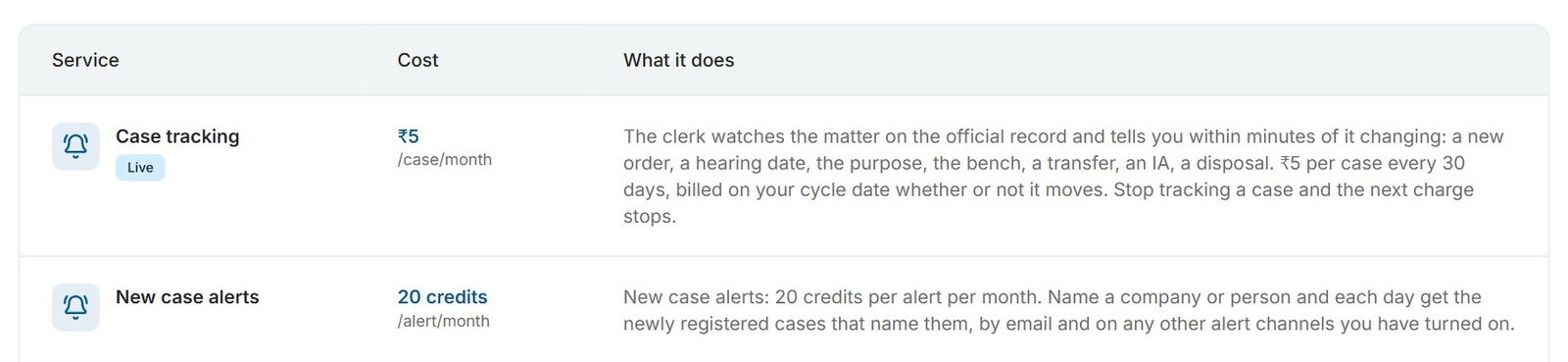
Sometimes broad is right. A large company’s legal team may want every new case naming the company, however many there are. In that case, Create anyway is a deliberate choice, not a mistake. At the time of writing (November 2026), each alert costs ₹20 a month whether it is broad or narrow; see the pricing page.
How do courts, state and district narrow an alert?
Untick the kinds of court you do not need, then pick a state, and a district if needed, to narrow High Courts and District Courts.
- Courts: Supreme Court (all India), Tribunals (all India), High Courts and District Courts are all ticked by default. At least one must stay ticked.
- State: appears when High Courts or District Courts is ticked; the default is “Any state”. With High Courts ticked, the note reads “High Courts: includes the High Court that serves this state.” So Haryana includes the Punjab and Haryana High Court.
- District: appears when District Courts is ticked and a state is chosen; the default is “Any district”, with the note “District Courts only.”
- Limits: one state and at most one district per alert. State and district never narrow the Supreme Court or tribunals, which are always all India. To watch two states, create two alerts.
Run the preview again after each change. The count usually falls quickly once a common name is tied to a state and district.
Should you set up a person differently from a company?
Yes. For a company, use the distinctive words and usually any state. For a person, use the full name and a location filter.
Companies
Use the part of the name that makes it unique. “Sunrise Agro Foods” is good; “Agro Foods” alone would match many companies. Group companies and brands need their own alerts, because each has different core words. Before you start, a quick search shows how courts have written the company’s name; our guide on finding all cases against a company explains how.
People
Always include the surname. Type only the person’s own name: leave out the father’s name, address and titles. For a common name, prefer a state and district filter over a middle name, because every core word must appear: an alert for “Asha Rani Verma” misses a case the court recorded as “Asha Verma”. Even with filters, a common name can still catch a namesake, so check each case before you act on it. Our post on namesakes in Indian court records explains why, and checking court cases by name shows how court records spell people’s names.
What about name variants and former names?
Create a second alert for each variant you know about.
Companies change names, trade under brands, and appear in court records in shortened forms. People’s names are spelt in different ways, such as “Harish Chandra Joshi” and “Harish Chander Joshi”. Matching does not guess at spellings: a variant matches only if all of your core words appear in it. So if you know a former name, a brand or a common misspelling, give it its own alert. Each one is billed separately, and you can pause or delete any of them later; see how to manage new case alerts.
What do good and weak alert names look like?
These worked examples show what the form looks for and how to fix a weak name.
| You type | We’ll look for | Verdict and fix |
|---|---|---|
| M/s. Sunrise Agro Foods Pvt Ltd | SUNRISE AGRO FOODS | Good. Distinctive words. All courts, Any state. |
| The Agro Foods Company | AGRO FOODS | Weak. Generic words match many companies. Add the distinctive word. |
| AK | AK | Warning. A single short word matches strangers’ initials. Type the full name. |
| K.R.S. Logistics LLP | KRS LOGISTICS | Good. Initials are joined, so “KRS Logistics” in a record matches. |
| Asha Verma | ASHA VERMA | Common name. Add a state and district, for example District Courts in Lucknow (Uttar Pradesh). |
| Asha Rani Verma | ASHA RANI VERMA | Narrower, but misses records written as “Asha Verma”. Prefer a filter. |
| Sun Rise Agro Foods | SUN RISE AGRO FOODS | A known court spelling of the same company. Keep it as a second alert. |
Why is my alert not catching what I expected?
- No cases yet. The alert’s page reads “No new cases yet. We check every day and let you know when one names this party, by email and on any other alert channels you have turned on.” A new alert does not send older cases, so an empty page at first is normal.
- A case you know about was missed. Check the party name on the case page. If the court spelt it differently, or one of your core words is missing, create an alert for that spelling.
- Too many strangers. Add more of the name, untick courts, or add a state and district, and preview again.
- The preview stopped. You may have hit the preview limit. You can still create the alert.
- It says you already have this alert. The same core words with the same filters count as one alert, even if you typed Pvt Ltd the second time.
The best alert name is the shortest one that still points at one party. Type it, read the We’ll look for line, look at the Recent examples, and narrow until the strangers are gone. For more ways to use alerts, see 7 ways to use New Case Alerts, and for what the feature does overall, the launch post. Then try your first name at ecourtsindia.com/dashboard/new-case-alerts.
Sources: the New Case Alerts screen in the eCourtsIndia dashboard (labels, preview and warnings), November 2026; eCourtsIndia pricing page (new case alert price, November 2026).
Frequently asked questions
What words does a new case alert ignore?
A new case alert drops noise words such as M/s, The, Pvt, Private, Ltd, Limited, LLP, Co, Company, Corp, Corporation, Inc, PLC and And, plus relation markers like S/o and W/o. It also removes punctuation and joins initials, so K.R.S. becomes KRS. The form shows the remaining core words in its We’ll look for line.
Does the order of words matter in a new case alert?
No. A case matches when all of your core words appear in one party name, in any order, on either the petitioner or the respondent side. Extra words in the party name are fine, but every core word you typed must be there.
Why does New Case Alerts say my name is too broad?
The form shows an amber warning when the preview finds more than 5 matching cases a day, or when the name is a single word of 3 letters or fewer, which can match strangers’ initials. Add more of the name, untick courts you do not need, or add a state and district. You can still click Create anyway.
Are the preview’s recent examples sent to me?
No. The preview shows up to five recent matches from the last 60 days only to help you judge the name, and it is free. A new case alert starts from the moment you create it and does not deliver older cases.
Should I add a middle name to a person’s new case alert?
Usually not. Every core word must appear in the party name, so an alert with a middle name misses cases the court recorded without it. For a common name, a state and district filter is a safer way to keep out strangers.
How do I watch a company’s former name or brand?
Create a separate new case alert for the former name or the brand. Matching does not guess at variants: a case matches only if all the core words of the alert’s name appear in one party name. Each alert is billed separately.
Update log: November 2026. eCourtsIndia (ecourtsindia.com) is an independent, non-government platform that mirrors public court records; it is not affiliated with any court or with the government.
Related guides
GuideHow-To Guides
How to Pause, Resume or Delete a New Case Alert (and How Billing Works)
How to manage your New Case Alerts on eCourtsIndia: read the alerts list, pause, resume or delete an alert, and understand the ₹20 monthly billing, low-balance pauses and wallet entries.
GuideHow-To Guides
How to Set Up a New Case Alert on eCourtsIndia (Step by Step)
A step-by-step guide to creating a New Case Alert on eCourtsIndia: type a party name, choose courts and filters, read the preview, and get a daily digest of newly registered cases that name them.
UpdateAI & Legal Technology
AI Clerk Update: What Lawyers Can Now Do in One Chat (November 2026)
AI Clerk on eCourtsIndia got its biggest update yet: find a case in a few taps, start tracking from the chat, prepare for hearings, read orders and ask law questions, all in one conversation. Here is what changed, with sample chats and use cases.