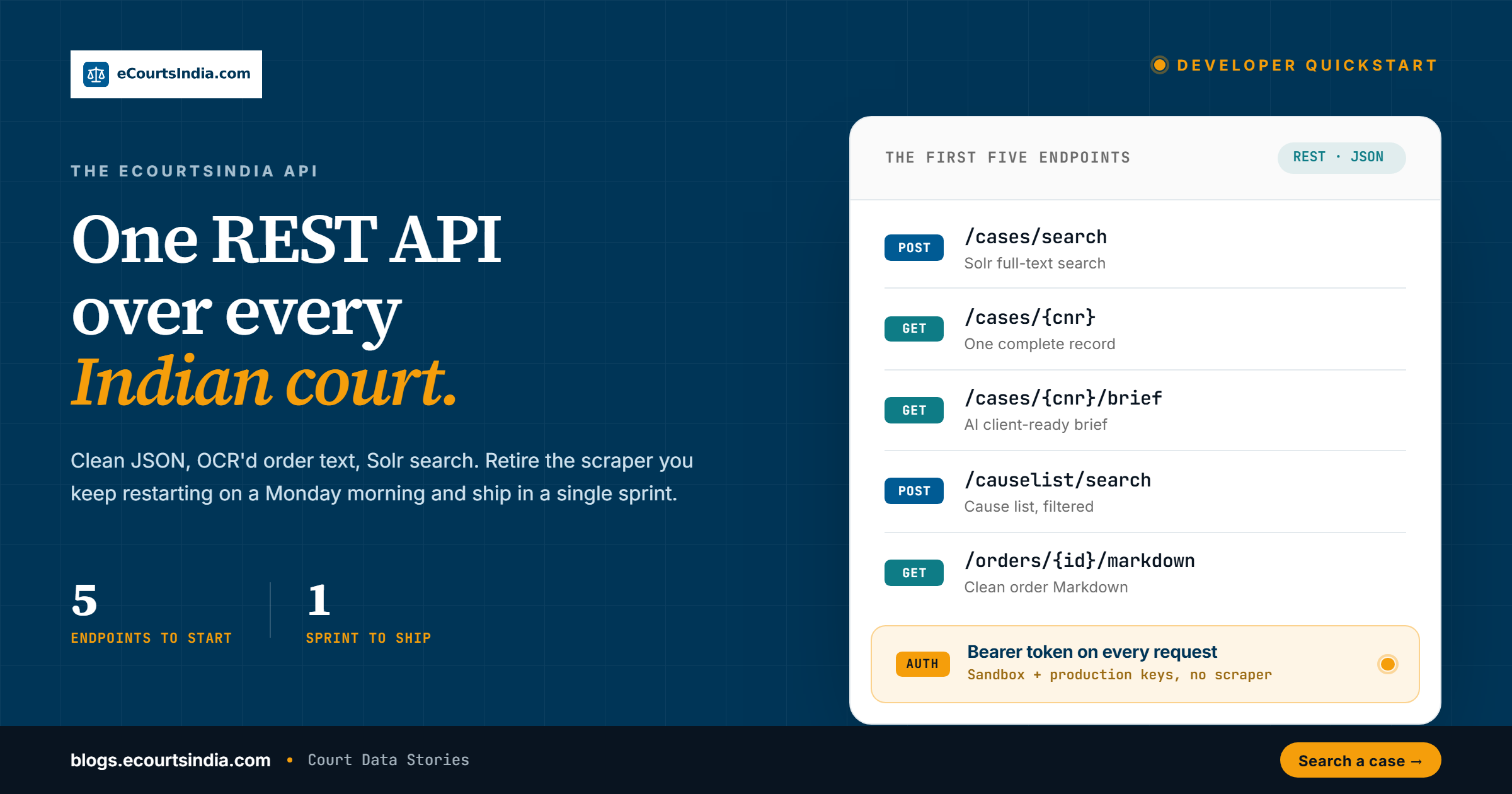
The eCourtsIndia API is the fastest way to build on Indian court data: one REST interface over a live index of 28 crore+ case records and growing, returning clean JSON, OCR’d order text, and Solr-powered search, so your product can replace fragile scrapers and ship in a single sprint.
TL;DR. Create an account, generate an API key, and send it as a bearer token. New accounts start with free trial credits, so you build against the live API at no cost. Seventeen partner endpoints are live (cases, cause lists, electoral rolls). Start with case search, CNR lookup, cause-list search, order PDFs and order-to-Markdown. Paginate (partner max page size 200). read the facet block for cheap counts, respect 429 with backoff and jitter, and surface errors honestly. The same index is also exposed through our MCP server for AI assistants.
Every Indian legaltech or background-verification team has a folder somewhere called scraper_v7 and a Slack channel called ecourts_down. The public services.ecourts.gov.in portal is a national asset. It is not a production API. The openjustice-in GitHub library describes it as “intentionally single-threaded”. That is fine for a journalist on deadline. It is not fine for a product with a customer-facing SLA. This post is the quickstart for the API you build on when scraping is no longer your day job.

Where the API sits
Three layers. At the bottom is services.ecourts.gov.in, the district and High Court portal run by the e-Committee of the Supreme Court of India. Alongside it is the NJDG, the National Judicial Data Grid, which publishes aggregate pendency and disposal figures. The eCourtsIndia API sits above these, with a live index of 28 crore+ case records and growing, refreshed against the source, clean JSON responses, OCR’d order text, and Solr-powered search. Your app calls us. We handle the hard part.
That coverage spans the Supreme Court, all 25 High Courts, the district and taluka courts, and 18 tribunal types — NCLT, NCLAT, ITAT, CESTAT, DRT/DRAT, NGT, AFT, SAT, TDSAT, APTEL, CAT, CCI, GSTAT, RCT, and the consumer commissions among them — so one query reaches across the country instead of one bench at a time. You do not maintain a session per state. You do not babysit a CAPTCHA loop. The index is the product, and the REST surface is just the door into it.
Auth and your first key
Create an account on eCourtsIndia. Generate an API key from the developer dashboard. Keys are prefixed eci_live_ and are sent as a bearer token on every request. New accounts start with a grant of free trial credits, so you can build and test against the live API at no cost until they run out; after that, usage is pay-as-you-go or covered by a subscription. Free with a token: enums, search/electoral capabilities, court-structure, available cause-list dates, and bulk-refresh status. Other calls spend credits.
Treat the key like a password. Keep it in an environment variable or a secrets manager, never in a committed file or a frontend bundle. If a key leaks, rotate it from the dashboard and the old one stops working immediately. Because trial and paid usage run against the same live index, code you write while spending trial credits works unchanged once you move to a paid plan. The only thing that changes is how much you can pull, not the shape of what comes back.
A first call is one line of curl. Set the header and hit the search endpoint:
curl -G https://webapi.ecourtsindia.com/api/partner/search \
  -H "Authorization: Bearer $ECI_KEY" \
  --data-urlencode "query=cheque bounce" \
  --data-urlencode "pageSize=5"
If that returns JSON, you are done with setup. Everything after this is just shaping the request body.
The endpoints you will use first
| Endpoint | Purpose |
|---|---|
GET /api/partner/search | Solr full-text search across every indexed case |
GET /api/partner/case/{cnr} | Complete record for one CNR (Case Number Record, the unique 16-character case ID) |
GET /api/partner/causelist/search | Cause list (the daily list of cases scheduled before a court) with advocate, judge, litigant, and date filters |
GET /api/partner/case/{cnr}/order/{file} | The order or judgment as a watermarked true-copy PDF (binary) |
GET /api/partner/case/{cnr}/order-md/{file} | The same order or judgment as clean Markdown |
Also wire GET /api/partner/case/{cnr}/order-ai/{file} for structured AI analysis, GET /api/partner/search/capabilities (free field catalog), POST /api/partner/case/{cnr}/refresh plus free POST /api/partner/case/bulk-refresh-status, and — if you need identity checks — /api/partner/electoral/* or MCP search_electoral_roll / lookup_epic (Solr field map in the complete API guide). The full inventory, params and examples live in the complete API guide. Base URL: https://webapi.ecourtsindia.com, paths unversioned under /api/partner/.
If you have been following our blog, the vocabulary is the same as our Case Type Encyclopedia and Case Status Dictionary. Codes are stable. Use the enum lookups before you hard-code a filter.

Fifteen lines of Python that replace a scraper
import requests, os

BASE = "https://webapi.ecourtsindia.com"
HEADERS = {"Authorization": f"Bearer {os.environ['ECI_KEY']}"}

def search_cheque_bounce_pending(court="DLHC01", year_min=2023):
    params = {
        "query": "cheque bounce",
        "courtCodes": court,
        "caseStatuses": "PENDING",
        "filingDateFrom": f"{year_min}-01-01",
        "pageSize": 200,
    }
    r = requests.get(f"{BASE}/api/partner/search", params=params, headers=HEADERS, timeout=10)
    r.raise_for_status()
    return r.json()["data"]["results"]

for c in search_cheque_bounce_pending():
    print(c["cnr"], c["caseType"], c["petitioners"][0])
That is the replacement for a hundred lines of BeautifulSoup, retry logic, CAPTCHA solvers, and polite apologies to the DevOps lead when the scraper goes down on a Monday.
What a response actually looks like
Reading the shape once saves you an afternoon of guesswork. Every response uses a {data, meta} envelope. The data object holds the result page, the paging fields, and the facet block; meta carries a request_id you can quote to support. A trimmed example:
{
  "data": {
    "totalHits": 3566,
    "page": 1,
    "pageSize": 200,
    "results": [
      {
        "cnr": "DLHC010012342023",
        "caseType": "CRL.M.C.",
        "caseStatus": "PENDING",
        "filingDate": "2023-02-14",
        "courtCode": "DLHC01",
        "petitioners": ["ABC TRADERS PVT LTD"],
        "respondents": ["STATE (NCT OF DELHI)"]
      }
    ],
    "facets": {
      "caseStatus": {"values": {"PENDING": 2410, "DISPOSED": 1156}},
      "filingYear": {"values": {"2023": 1980, "2024": 1586}}
    }
  },
  "meta": {"request_id": "0HMVABCDEF123"}
}
Note three things. The totalHits is the full hit count, not the count on this page. The results array is your page of records, each keyed by CNR. The facets block is a pre-aggregated breakdown of the entire result set, not just the current page. That last point is the one people miss, and it is the one that makes dashboards cheap.
The single-CNR endpoint returns more than this trimmed search summary. As the source courts move to richer record formats, High Court and District Court cases are increasingly captured with the additional fields the courts now publish: e-filing number and date, filing type, litigant type, case-type conversion history, and structured party lists on the High Court side, plus per-case process, interim-application, transfer, and hearing-history arrays on the district side. Coverage of these fields is being expanded over time, so read the full record when your product needs more than the search facets give you.
Pagination, facets, and the Solr model
Search responses paginate with page and pageSize. Partner max page size is 200 (default 20; anonymous web search is capped at 50). Facets come back on every response, telling you how your 3,566-hit result set distributes across case type, status, court, filing year, and state. That facet block is the backbone of any dashboard you are about to build. Do not ignore it.
For cause lists, the cursor is offset-based. Start at offset=0, limit=100. Increment offset by limit. Stop when the returned count is less than the limit.
One habit pays off across both styles. Paginate on the server side and never pull a full result set into memory just to slice it. If a query returns tens of thousands of hits, walk the pages and process each batch as it lands. If you only need counts, read the facet block and skip the pages entirely. The cheapest page is the one you never fetch.
Two more details on search paging. Results come back relevance-sorted by default, or you can sort on a structured field with a sensible fallback when a value is missing. Walk page until hasNextPage is false; there is no separate cursor parameter on partner search.
Rate limits, retries, and being a good client
Production keys carry rate limits. The documented defaults are 100 requests per minute, 3,000 per hour, 50,000 per day, and 10 concurrent requests, and they are configurable per partner. Treat those as the starting point rather than a hard contract: the live ceiling is always the one returned in your response headers, not the one in a blog post. Read the headers and let them drive your client.
When you cross the ceiling, the API returns 429 Too Many Requests. Do not hammer it. Back off, ideally with a Retry-After header if one is present, and add jitter so a fleet of workers does not all retry on the same tick. Reserve retries for transient failures: a 429, or a 500-class response, or a timeout. Never retry a 400 or a 422, because the request is malformed and trying again changes nothing. Here is a small wrapper that captures the right behaviour:
import time, random, requests

def get_with_retry(url, params, headers, max_tries=5):
    for attempt in range(max_tries):
        r = requests.get(url, params=params, headers=headers, timeout=15)
        if r.status_code == 429 or r.status_code >= 500:
            wait = float(r.headers.get("Retry-After", 2 ** attempt))
            time.sleep(wait + random.uniform(0, 0.5))
            continue
        r.raise_for_status()
        return r.json()
    raise RuntimeError("exhausted retries")
Exponential backoff with jitter, a cap on attempts, and a hard stop. That is the whole discipline. A client that respects 429 and reads Retry-After will outlast one that does not, because the server rewards good behaviour with steadier throughput.
Error handling that does not lie to your users
Errors come back as JSON with a status code that means what it says. A 401 is a bad or missing key, so check the bearer token before you blame anything else. A 400 or 422 is a malformed body, often a filter in the wrong format. A 404 on a CNR lookup means the record is not in the index yet, which is different from the case not existing. A 429 is rate limiting. A 500 is on us, and it is the one case where a retry is the right move.
Surface these honestly. If a lookup 404s, tell the user the record is not indexed yet rather than showing an empty page that looks like a bug. Log the request id from the response when something goes wrong, because it is the fastest way for support to trace what happened. Silent failure is worse than a clear error message every time.
A second worked example: a litigant portfolio scan
The first example searched by topic. The second searches by party across a window of time, which is the shape most background-verification and monitoring workloads actually need. Same endpoint, different filters, and now paginated properly so nothing is left behind.
import requests, os

BASE = "https://webapi.ecourtsindia.com"
HEADERS = {"Authorization": f"Bearer {os.environ['ECI_KEY']}"}

def litigant_portfolio(name, courts, statuses="PENDING", since="2020-01-01"):
    page, out = 1, []
    while True:
        params = {
            "litigants": name,
            "courtCodes": courts,
            "caseStatuses": statuses,
            "filingDateFrom": since,
            "page": page,
            "pageSize": 200,
        }
        data = get_with_retry(f"{BASE}/api/partner/search", params, HEADERS)["data"]
        out.extend(data["results"])
        if not data.get("hasNextPage"):
            break
        page += 1
    return out

cases = litigant_portfolio("ABC Traders", courts=["DLHC01", "HCBM01"])
print(f"{len(cases)} matching cases")
Pass multiple court codes to widen the net across benches. Combine courtCodes, caseStatuses, and a filingDateFrom window to scope a portfolio to exactly the cases that matter. Read the facet block on the first page if all you need is a count by status. The same primitives compose into a watchlist, a due-diligence report, or a litigation dashboard.
The gotchas we promise to be honest about
- Court code drift. NCLT bench codes require a trailing zero (
NCLTMB0, notNCLTMB). Details in our Case Type Encyclopedia. - Act filter format. The
actsAndSectionsfilter expects the full stored text (INDIAN PENAL CODE – 302), not abbreviations (IPC 302). Use free-text query for loose matches. - Query is Solr. Plain keywords plus facets are the robust default. Quoted phrases, uppercase
AND/OR/NOT, parentheses and trailing wildcards work inquery(an earlier phrase-plus-boolean HTTP 500 is fixed). Never lead with*. Do not put operators in name fields; usenameMatchModethere. PrefercaseNumbersfor an exact N/YYYY lookup. - Misc cause list status fields. Sometimes empty. Our flagship data piece breaks this down.

Portfolio monitoring by polling
The API does not push. There are no webhooks or callbacks, so portfolio monitoring is a polling pattern. To re-pull a set of cases from the source, call POST /api/partner/case/bulk-refresh with a JSON array of up to 50 CNRs. It queues each CNR for a fresh scrape (typically 2–10 minutes against government servers) and returns a per-CNR queued status, not the case data itself. Poll free POST /api/partner/case/bulk-refresh-status, then read each case back with GET /api/partner/case/{cnr} and diff. Search can lag a refresh by 1–2 hours, so never compare off search. For a single case, POST /api/partner/case/{cnr}/refresh (POST, not GET). Batch in groups of 50.
Cause lists have a batch companion worth knowing here. POST /api/partner/causelist/cnr/batch takes 1 to 100 CNRs in a single call, with the body { "cnrs": [ ... ] } and a one-element array for a single case, and it answers whether each CNR is listed for an upcoming hearing and what it is listed for. There is no single-CNR cause-list GET; the batch route is the one path. Billing is per CNR: ₹0.30 on pay-as-you-go, ₹0.10 on a subscription.
How the API maps to the MCP
The MCP server is the same index and the same operations, exposed as tools an AI assistant can call directly instead of HTTP routes you wire by hand. Where your code calls GET /api/partner/search, an assistant connected to the MCP calls a search_cases tool with the same filters and gets the same JSON back. The CNR lookup (get_case_details), the cause-list search (search_causelist), the order text as clean Markdown plus a certified PDF (get_order_markdown), the AI analysis of an order (get_order_ai_analysis), and the full list of a case’s orders and judgments (list_case_orders) each have a matching tool, and the MCP layer adds convenience tools that compose several calls for you: a client-ready case brief (get_case_brief), a one-shot search-and-fetch (search_and_get_first_case), and programmatic portfolio monitoring (monitor_portfolio). There are 37 tools on MCP v4.32: eighteen never consume credits, including the seven statute-book tools (search_statute, lookup_provision, lookup_case_provisions, map_provision, get_cpc_rule, lookup_offence, list_instruments). Add https://mcp.ecourtsindia.com/mcp and click Connect (OAuth). Leave Client ID/Secret empty. ?token= is only a fallback. Electoral MCP tools: search_electoral_roll, lookup_epic, get_electoral_capabilities (free). Cause lists cover district and taluka courts only. The case index is 28 crore+ records and growing. Full catalogue: mcp.ecourtsindia.com/tools.
Practically, that means you prototype a workflow in plain language through the MCP, confirm the filters and the result shape, then drop the exact same parameters into your production REST client. The MCP is the fast path to discovery. The API is the fast path to scale. They are two front doors to one back end. Our MCP 101 post walks the no-code version end to end.
Where we are honestly not the right answer
If you need to file on services.ecourts.gov.in, use the portal directly. Filing is not a read operation and we do not offer it. If you need document-level e-signing, use a purpose-built CLM. If you need billing and trust accounting, use a practice management product. We are the data layer. We are not the practice tool.
A few more honest edges. If you need a real-time guarantee that a record reflects the source within seconds, remember that the index refreshes against the portal rather than mirroring it instantly, so a freshly filed case can lag. If your entire need is a single CNR lookup once a month, the public portal will do and you do not need a key. And if you are building something that depends on data the source does not publish, no API can invent it. We surface what the courts release, cleaned and indexed, and nothing more. Knowing where the edges are is part of building well.
What this means for builders
You can ship a credible product on Indian court data in one sprint. The hard engineering has already been done. Your time is better spent on the user experience and the specific workflow for your audience. Read the docs at ecourtsindia.com/api. Connect the MCP at mcp.ecourtsindia.com. See our MCP 101 post for the no-code path.
The fastest way to tell whether your legaltech MVP works is to stop fighting the data layer and start talking to customers. Our API exists so you can do exactly that.
Further reading: the complete API guide (17 endpoints, examples, LLM .txt), LLMs.txt for Indian Courts, CNR Number Decoded.
Frequently Asked Questions
What is the eCourtsIndia API?

It is a production-grade REST layer over Indian court data, sitting above services.ecourts.gov.in and the NJDG. It serves a live index of 28 crore+ case records and growing, with clean JSON, OCR’d order text, and Solr-powered search, so your app never touches a scraper. Read the full docs at ecourtsindia.com/api.
How do I get an API key?
Create an account on eCourtsIndia and generate a key from the developer dashboard. Keys are prefixed eci_live_ and sent as a bearer token on every request. New accounts start with free trial credits, so you can build against the live API at no cost until they run out; after that, usage is pay-as-you-go or covered by a subscription. A few reference endpoints (enums, available cause-list dates, court structure) carry no credit charge but still need the token. Start at the API page.
Which endpoints should I use first?
Five cover most needs: /api/partner/search for Solr full-text search, /api/partner/case/{cnr} for one complete record, /api/partner/causelist/search with advocate, judge and date filters, /api/partner/case/{cnr}/order/{file} for the true-copy PDF, and /api/partner/case/{cnr}/order-md/{file} for clean Markdown. Try the same index live through eCourtsIndia search before you wire up your code.
How does pagination and faceting work?
Search responses paginate with page and pageSize, capped at 200 results per page on partner search, and every response returns a facet block showing how results split across case type, status, court, filing year and state. For cause lists, use offset-based paging: start at offset 0, increment by your limit, and stop when the count drops below the limit. More walkthroughs sit in our developer guide.
What filter gotchas should I watch for?
A few trip people up. NCLT bench codes need a trailing zero, like NCLTMB0. The actsAndSections filter expects the full stored text such as INDIAN PENAL CODE 302, not IPC 302. Solr operators work in query; use caseNumbers for exact N/YYYY. High Court search keys need a bench suffix (DLHC01, HCBM01). Check live enums.
Can I monitor a portfolio or file cases through the API?
Filing is not supported; for that, use the services.ecourts.gov.in portal directly, since filing is not a read operation. There are no webhooks, so monitoring is a polling pattern: call bulk-refresh with up to 50 CNRs to queue a fresh pull, then read each case back and diff what changed. Expect 2 to 10 minutes. Connect the MCP at mcp.ecourtsindia.com.
How should I handle rate limits and errors?
Production keys carry rate limits, with documented defaults of 100 requests per minute, 3,000 per hour, 50,000 per day and 10 concurrent, configurable per partner; the live limit is always the one in your response headers. When you hit a 429, back off and respect any Retry-After header, adding jitter so workers do not retry in lockstep. Retry only on 429 or 500-class responses and timeouts; never retry a 400 or 422, since a malformed request will fail again. Surface a 404 on a CNR as not yet indexed rather than as an empty result. See the API docs for current limits.
How does the API relate to the MCP?

They are two front doors to one back end. The MCP server exposes the same index as 37 tools (v4.32) an AI assistant can call. Add https://mcp.ecourtsindia.com/mcp and click Connect (OAuth 2.1). Leave Client ID and Secret empty. ?token= is only a fallback for clients that cannot do OAuth. Eighteen of the 37 tools never consume credits, including the seven statute-book tools. Cause lists cover district and taluka courts only. Prototype in MCP, then ship REST. Catalogue: mcp.ecourtsindia.com/tools.