Most legal due diligence and background verification systems in India are built on a flawed assumption: that a court case can be reliably linked to a person using their name, father’s name, address, and date of birth. Indian court records themselves often do not contain those identifiers. So if your due diligence engine depends on exact identity matching, it will miss real cases and produce false negatives, which is the most dangerous outcome this work can produce.
Indian legal due diligence is not about proving a person has a case. It is about proving that a case belongs to that person. Once you accept that, you stop building a keyword lookup and start building a probabilistic engine that gathers wide, reads deep, and scores how confident it is that each case belongs to your subject. This guide is the engineering blueprint for that engine, built on the eCourtsIndia API and MCP, and verified call by call against live court data. If you have not set up access yet, start with our walkthrough of the eCourtsIndia API, then come back here for the due diligence layer that sits on top of it.

How to perform legal due diligence in India: the seven steps
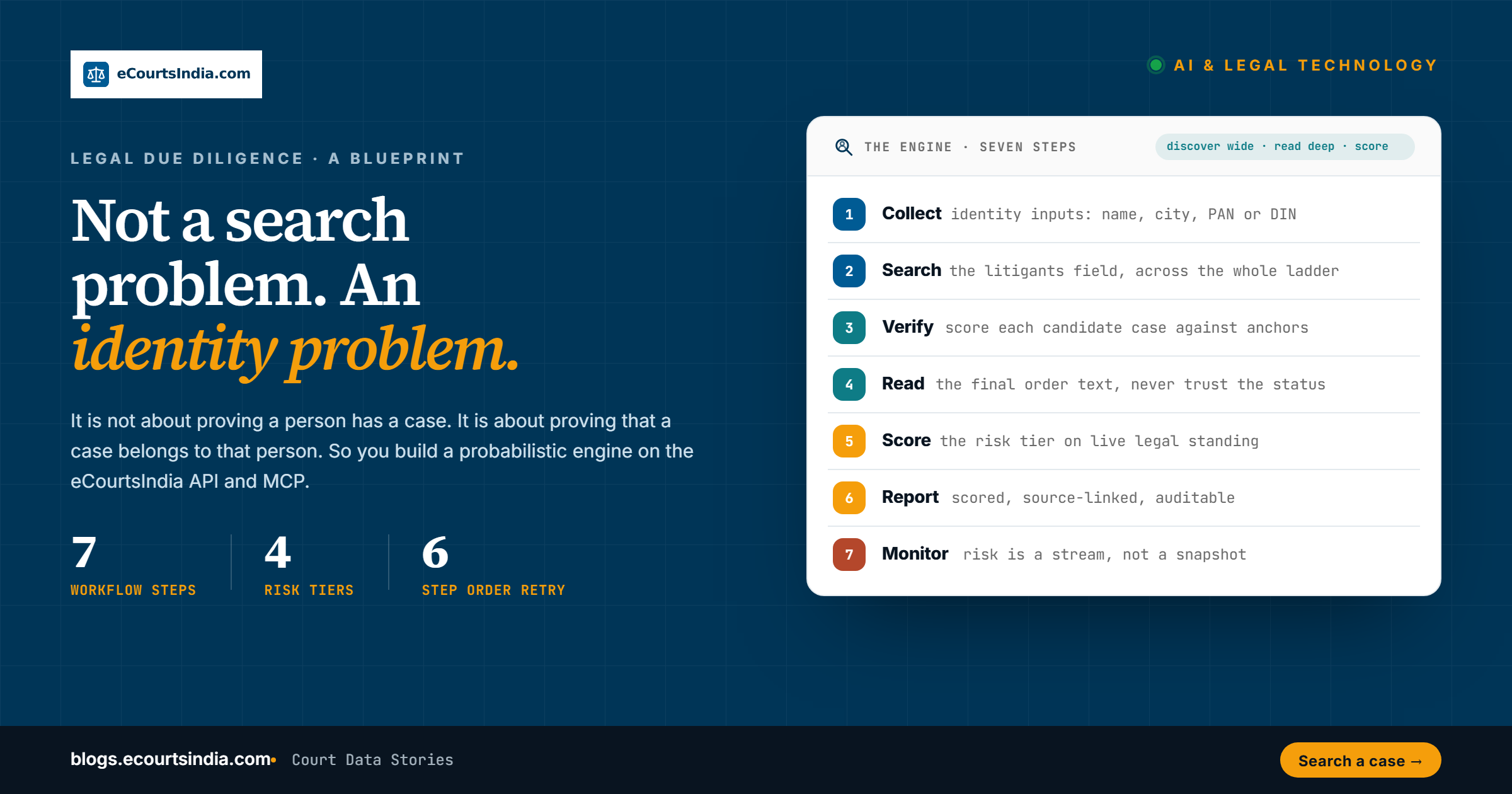
Here is the whole workflow in one place before we go deep on each part. Every serious legal due diligence or background-verification engine on Indian court data runs these seven steps.
- Collect identity inputs. Force a full name plus at least a city, and ideally a company, a PAN, or a DIN (Director Identification Number), before any search runs.
- Search the litigation. Query the litigants field across district courts, High Courts, the Supreme Court, and tribunals, and read the facets.
- Verify identity. Score each candidate case against anchors. Attribute only at or above your threshold.
- Read the orders. For every serious case, read the final order text, do not trust the status field.
- Score the risk. Classify each attributed case into a risk tier based on its live legal standing.
- Generate the report. Output a scored, source-linked, auditable document.
- Monitor. Keep watching the high-risk subjects, because risk is a stream, not a snapshot.
The September 2026 update: what changed since this guide first ran
Last updated: 23 September 2026
This guide is maintained against the live platform, and the platform has moved. If you built against the May or July 2026 version, these are the changes that matter, each covered in depth in its section below.
- The engine this guide describes now ships as a product. LegalCheck is eCourtsIndia’s own identity-first legal background check for a person or a company. It runs in the web app, as
POST /api/partner/legal-check, and as the MCP toolssubmit_legal_checkandget_legal_check, and returns a risk band with every match, its identity band and what it was matched on. One accepted check costs ₹99, or ₹33 on an active subscription; failed jobs are refunded. If you want the output rather than the engineering, start with our LegalCheck API guide. The build-or-buy section below explains when building your own still makes sense. - 23 REST endpoints and 39 MCP tools. The partner API now covers search, case detail, orders, refresh with free bulk-refresh status, enums, court structure, cause lists including batch checks by CNR, electoral roll and LegalCheck. The MCP server (v4.46) exposes 39 tools, 19 of them free. Note one breaking change from May: the court-structure endpoints moved to
/api/partner/causelist/court-structure/*. - The tribunal layer is live. 18 tribunal and commission types are searchable, 44 lakh+ records: NCLT, NCLAT, ITAT, CESTAT, DRT/DRAT, NGT, AFT, CAT, SAT, TDSAT, APTEL, CCI, GSTAT, RCT and the consumer commissions. One filter,
courtLevels=TRIBUNAL, sweeps all of it. - FIR PDFs as a separate layer. Crime Reports holds 12 lakh+ FIR PDFs from 13 states and union territories. Useful context for a criminal matter you have already attributed, never a substitute for court search.
- Fuzzy and multi-value name matching.
nameMatchMode(all/any/phrase/fuzzy) replaces the old one-search-per-spelling alias loop, and the name filters accept multiple values in one call. - Query operators verified working. Quoted phrases, uppercase AND/OR/NOT, grouping and trailing wildcards, including phrase-plus-boolean combinations, are supported in the free-text
queryfield. - Monitoring is a first-class tool.
monitor_portfoliowatches a set of CNRs and reports deltas, and the cause-list tools (check_cnr_causelist,get_court_docket) catch matters listed for upcoming hearings. - Every finding is publicly linkable. Each CNR, litigant, lawyer and judge has a stable public page on ecourtsindia.com, and this guide includes the full URL grammar so your reports cite the verifiable record.
Why most Indian legal background verification fails
If you are evaluating a legal risk screening or litigation due diligence platform, or building one, it helps to understand exactly where the legacy model breaks. The failures are structural, not cosmetic, and they explain why so many compliance screening reports in India quietly clear people they should have flagged.
Indian courts do not capture national identity markers such as Aadhaar, PAN, or passport numbers in standard case metadata. More surprisingly, even a father’s name or a residential address is absent from the structured record in the overwhelming majority of civil and commercial filings; where it exists at all, it sits as free text inside an uploaded order, not in a queryable field. The cover sheet usually carries a name and almost nothing else that uniquely identifies a human being.
Then there is the FIR irony. An FIR, the First Information Report, is filed by a person who has just been wronged. In the ordinary case the complainant does not know the perpetrator’s parentage or exact address. If you are robbed on the street, you do not tell the police you were robbed by a named person, son of a named father, resident of a specific house. If an FIR does contain a perfectly mapped name, father’s name, and address of an unknown suspect at the moment of filing, it is statistically more likely to be a targeted complaint than a routine crime report. So the very documents the legacy model leans on were never going to carry those fields. The model asks the data for something it structurally cannot give.
On top of the missing fields sit the everyday messes of Indian name data: spelling variations across regional transliteration, the use of initials, married versus maiden names, and litigation filed in the name of a company a person controls rather than the person. A deterministic matcher treats every one of these as a miss. A probabilistic engine treats them as signals to weigh. This is the same shift from PDFs to structured data that runs through our step-by-step legal due diligence workflow, taken one layer deeper into identity.

Why FIR search alone is not legal due diligence
Many background-check products in India stop at FIR and police data. An FIR tells you that someone alleged something. It does not tell you whether a company is being wound up, whether a bank has filed for recovery, or whether a director has a personal insolvency petition against them. The risk that actually sinks a transaction usually sits far from the police station: in NCLT insolvency, DRT recovery, cheque-bounce matters under Section 138 of the NI Act, commercial suits, tax litigation, and execution proceedings. A due diligence engine that searches only criminal records is structurally blind to most corporate and financial exposure. Real coverage means the whole ladder, civil, commercial, criminal, and tribunal, scored as one picture. FIRs still have a place as one input among many: Crime Reports on eCourtsIndia holds 12 lakh+ FIR PDFs collected from 13 states and union territories, at ₹1 per PDF, which is useful for reading the allegation behind a criminal case you have already attributed. Coverage is partial, so an FIR search coming back empty proves nothing on its own.
Legal due diligence is an identity resolution problem
Because a name cannot certify identity, a defensible report has to be probabilistic. You gather every signal you can about the person, search broadly, and then score how confident you are that each case actually belongs to them. You present that confidence honestly. A report that says “we found fourteen matches, nine of which we attribute to your subject with high confidence and five we flag as possible matches pending further anchors” is far more valuable, and far more defensible, than one that prints fourteen cases as fact.
This is exactly where the next generation of legal-tech and background-verification companies will be built. The teams who win India’s growing legal due diligence market will not be the ones with the longest list of name hits. They will be the ones whose matching is smart. With modern AI you can read the language of an order, cluster cases by the same advocate, the same co-parties, the same locality, and the same business relationships, and assemble a probabilistic identity that no keyword search could. We made the broader market case for this in court data is a FinTech dataset. The edge is in the algorithm you wrap around the data.
| Approach | Limitation |
|---|---|
| Name plus date of birth matching | Court records rarely contain a date of birth, so the join key does not exist |
| FIR-only or criminal-only systems | Miss civil, commercial, and tribunal exposure, which is where corporate risk lives |
| Static or periodically scraped databases | Go stale; a warrant or insolvency filed last week is invisible |
| Court-order-aware probabilistic systems | Read the order text, anchor identity, and score confidence. Higher accuracy, auditable |
What you are building on: one index across India’s judicial ladder
Your platform’s unfair advantage is the structural depth of the eCourtsIndia index compared to surface-level scrapers. The data spans the whole judicial ladder and refreshes daily: the Supreme Court, all 25 High Courts, district and taluka courts in all 36 states and union territories, and 18 tribunal and commission types carrying 44 lakh+ tribunal records, across 32 crore+ case records and growing. Alongside the cases sit 125 crore+ orders and judgments, which is what makes order-text anchors possible at all.
The single most important decision: which field you search
Before any code, internalise this one point, because it decides whether your engine is accurate or noisy. The same name returns wildly different results depending on which parameter you put it in.
| Field | What it matches | Use for identity? |
|---|---|---|
| query (general full text) | Everything: party names, advocates, judges, and any mention inside order or judgment text | No. Powerful for reading, but full of false positives for identity |
| litigants | Every petitioner and every respondent on a case, both sides at once | Yes. This is the field for finding a person or company |
| petitioners / respondents | Tends to match only the first named party | No. Misses people buried in a long party list, for example respondent two of eight |
Under the hood, litigants is a Solr copy-field of petitioners plus respondents, which is exactly why it catches a party on either side and at any position in the cause title, while the per-side filters do not. We have seen a person named as respondent number two of eight not get returned by the respondent filter, yet show up correctly through the litigants field. So for person and company discovery, you use litigants, always. The general query field has its own job, because it searches the full text of every order and judgment in the index. That is a superpower for reading a case and for thematic search, and a trap for identifying a person.
The volume paradox: thousands of “results” versus the clean set
During QA, engineers notice that the public website shows roughly eleven thousand results for a name while the clean API call returns about a hundred and fifty. Do not configure your wrapper to chase the bigger number. The public interface runs relaxed, unquoted, tokenized searches that match a first name OR a last name independently, and it cross-contaminates party registers with advocate names and stray text mentions. The structured litigants endpoint isolates true party associations and gives you the precise set your processing loop needs. The big number is noise to strip, not signal you are missing.
To make the danger concrete, we ran a single live call for a common name through the litigants field. The result (as of 2026):
litigants = "Rajesh Kumar" -> over 650,000 total hits
More than six hundred and fifty thousand cases. That is not one person, it is thousands of people sharing a name. Any system that prints those as one subject’s record is dangerous. The whole craft of this work is turning a number like that into a short, scored, defensible list.
Setup: endpoints, auth, and the two ways in
There are two ways to talk to the data, and a serious due diligence product usually uses both. The first is the partner REST API, now 23 endpoints covering search, case detail, orders, refresh, enums, court structure, cause lists, electoral-roll lookup and LegalCheck, which you call from your backend for high-throughput ingestion. The second is the MCP server, which lets an AI agent like Claude call the same data as tools, which is ideal for the reasoning, reading, and report-writing steps. Connecting an agent: add https://mcp.ecourtsindia.com/mcp as a custom connector and click Connect (OAuth; no key or Client ID needed). ?token= is a fallback. Identity lookup uses REST /api/partner/electoral/* or MCP search_electoral_roll / lookup_epic. Full REST inventory: how to use the eCourtsIndia API. Pricing and limits are on the API pricing page, the reference is at the API docs, and the agent setup lives at the MCP page. A free account starts with ₹200 in credits. For sustained, high-volume screening, the enterprise tier with dedicated infrastructure is the right fit.
The REST entry points you will call most are case search and cause-list search. Around them sit case detail, order PDF/Markdown/AI, refresh plus free bulk-refresh-status, enums, search capabilities, court structure, electoral search for identity work (REST and MCP; ECI state codes such as S01), and the LegalCheck endpoints under /api/partner/legal-check. Dates are always YYYY-MM-DD. Here is a litigant search with pagination and a filing-date window:
# Search a litigant (max page size, YYYY-MM-DD date window)curl --location 'https://webapi.ecourtsindia.com/api/partner/search?Page=1&PageSize=100&FilingDateFrom=2016-01-01&FilingDateTo=2026-12-31&litigants=Havells India Limited' \ --header 'Authorization: Bearer eci_live_xxx'# Capture aliases and spelling variants in ONE call: repeat the key (values are OR'd)# and let fuzzy matching absorb one edit per tokencurl --location 'https://webapi.ecourtsindia.com/api/partner/search?litigants=Virendra Vora&litigants=V Vora&nameMatchMode=fuzzy' \ --header 'Authorization: Bearer eci_live_xxx'# Cause list by registration number (strip any date suffix from q)curl --location 'https://webapi.ecourtsindia.com/api/partner/causelist/search?q=CS/253813/2025&state=WB&districtCode=3&courtComplexCode=1160009&includeCourtroom=true&date=2026-05-27' \ --header 'Authorization: Bearer eci_live_xxx'
Two rules that save you from silent data loss. Pagination is mandatory: in the REST API PageSize maxes out at 100 and defaults to 20 (the MCP search_cases default is 10), so loop the page number until a page returns empty, or you will truncate a record. And name matching is tunable, not guesswork: the nameMatchMode parameter controls how the tokens of a name must match, with all (default, every token), any, phrase (exact ordered phrase), and fuzzy (one edit per token, which absorbs Virendra/Virender-style spelling drift). In a live check, litigants=Virender Vora with nameMatchMode=fuzzy returned 113 candidate matches including the variant spellings that an exact search would have missed. The REST API also takes multiple names by repeating the key (litigants=A&litigants=B, values are OR’d), which replaces the old one-search-per-spelling loop for alias capture. For the cause list, q takes the registration number only, with no year or date suffix appended.
The request payloads at a glance
Expressed as MCP tool arguments, the five core operations you will call most are tiny. Build a thin adapter so your code speaks one dialect and maps to REST when needed.
# searchsearch_cases { "litigants": "Havells India Limited", "pageSize": 50 }# fuzzy name matching (catches spelling variants in one call)search_cases { "litigants": "Virendra Vora", "nameMatchMode": "fuzzy" }# case detail (batch)batch_get_case_details { "cnrs": ["DLHC012677132015", "DLHC010088952016"] }# order retrieval + AIget_order_ai_analysis { "cnr": "DLHC012677132015", "filename": "order-3.pdf" }# refresh a stale caserefresh_and_wait_for_case { "cnr": "DLSH010067252025" }# ongoing monitoring (register once, get per-case deltas)monitor_portfolio { "cnrs": ["DLHC012677132015", "DLSH010067252025"] }
Building AI due diligence agents on the MCP toolset
The deeper operations, pulling case detail, reading orders, extracting AI analysis, and refreshing stale records, are exposed as MCP tools, which is what makes this so well suited to AI agents and coding assistants. An agent can run the whole workflow as a sequence of tool calls and reason about the results between steps, something a raw REST loop cannot do on its own. The toolset groups into five jobs:
- Discovery:
search_cases(full-text Solr plus facets, withcourtLevelsto slice SC/HC/DC/TRIBUNAL andnameMatchModefor fuzzy names),search_and_brief_top_cases(search plus structured briefs for the top results in one round trip, the fastest way to triage),search_and_get_first_case, andget_search_capabilities, a free, machine-readable catalog of every valid filter, sort field, facet and cap, so your integration discovers new capabilities instead of hardcoding them. - Case detail:
get_case_brief,batch_get_case_details(2 to 20 CNRs at once),get_case_details, andget_case_with_latest_order(mandatory first call for any critical or high case). - Order intelligence:
get_order_ai_analysis(identity anchors plus a clean summary) andget_order_markdown(order text as Markdown, with the certified PDF alongside). Order text over MCP comes as Markdown or AI analysis; the raw signed PDF is a REST-API download, not an MCP tool. - Freshness and monitoring:
refresh_case,refresh_and_wait_for_case,bulk_refresh_cases(up to 50 at once),check_refresh_status, andmonitor_portfolio, which takes a set of CNRs and reports per-case deltas: status changes, new orders, new or changed hearing dates. Failed refreshes are refunded automatically. - Validation, geography and cause lists:
fetch_live_enums,lookup_enum,get_states,get_districts,get_courts,get_complexes,search_causelist,get_available_causelist_dates,get_court_docket(a courtroom’s full list for a date), andcheck_cnr_causelist(hand it 1 to 100 CNRs and it reports which are set down for an upcoming hearing, and where and what for).

Phase 0: validate your codes, or your report will be falsely clean
This is the least glamorous step and the one that causes the most dangerous failure. The search fails silently. If you pass a wrong case-type code or an invalid court code, the API returns zero results with a 200 status and no error. Zero results then reads as “this person is clean,” which is the worst mistake you can make by accident. So before any filtered search, validate your codes against the live enums and cache them.
import requestsBASE_URL = "https://webapi.ecourtsindia.com/api/partner"HEADERS = {"Authorization": "Bearer eci_live_xxx"}def validate_environment(): # Cache CaseTypeEnum, CaseStatusEnum, HighCourtCodeEnum, NcltBenchEnum, courtCode (~10,300). # Free, no credit charged; the API caches this for an hour. r = requests.get(f"{BASE_URL}/enums", headers=HEADERS, params={"types": "caseType,caseStatus,courtCode"}) r.raise_for_status() return r.json()
Specifics that trip up new integrations. Case types must be codes, not plain English, so a writ petition is WP_C, not “writ petition”. High Court codes carry a bench suffix, so Delhi High Court is DLHC01, not DLHC. NCLT bench codes carry a trailing zero (NCLTDL0, NCLTMB0). For a statute reference, prefer free text in the query, for example IPC 302, over the strict acts-and-sections filter, which needs the full stored string. The free-text query field does understand Solr operators, and they are worth using: an exact phrase in double quotes, uppercase AND/OR/NOT, grouping with parentheses, and a trailing wildcard such as neglig*. Combining a quoted phrase with a boolean, for example "specific performance" AND injunction, works and returned 28,155 matters in a live check in July 2026 (an earlier upstream bug that broke this combination has been fixed). The one hard rule: never start a term with *, which forces a full-index scan. For the name fields (litigants, petitioners, respondents, advocates, judges), do not reach for operators at all; use nameMatchMode instead. The human-friendly version of every field, with screenshots, is in our eCourtsIndia search guide.
Filtering by geography
Geography is one of your strongest disambiguators, because a real person’s litigation clusters in the states where they live and work. The platform covers district and taluka courts in all 36 states and union territories. Build the filter from the hierarchy, then drill in using the facet paths the search returns. Note that geography is path-based, not code-based: the numeric state and district codes are not directly filterable, only the courtLocationPaths facet strings are.
get_states() # 36 entries: DL=Delhi, MH=Maharashtra, SC=India (Supreme Court)...get_districts(state="DL") # High Courts appear as districtCode = HCget_courts(state="DL", districtCode="1")# After a broad search, results carry courtLocationFacetPath values like "0/DL" and "1/DL/2".# Feed those exact strings back in to narrow, do not construct them by hand:search_cases(litigants="Rajesh Kumar", courtLocationPaths="1/DL/2")
Phase 1: wide-net discovery and reading the facets
Now the wide net. Run a litigants search and read the facets that come back with it. Facets are the aggregate breakdown of your result set by court, state, year, status, and case type. They tell you the shape of a person’s litigation before you read a single order. Here is a real, live example for a company, which behaves the same way a person does.
search_cases(litigants="Havells India Limited", pageSize=50)# Example as of May 2026 (figures refresh daily): 157 total hits, with facets:# caseStatus: DISPOSED 77, PENDING 75, DISMISSED 2# caseType: CS 48, CC 31, WP_C 13, ITA 3 ...# courtCode: DLHC01 47, DLND02 21, KAHC01 6, SCIN01 6, NCLTDL0 3 ...# stateCode: DL 98, RJ 10, KA 7, UK 6, MH 4 ...# filingYear: 2025 35, 2024 16, 2023 20 ...
Look how much you learn before reading anything. This entity is litigated mostly in Delhi, with a real presence in Rajasthan and Karnataka. It has civil suits and a stack of criminal complaint cases, which for a manufacturer usually means cheque or trademark matters, and it even has three matters at the NCLT in Delhi. You can sanity check this against the public Havells India Limited litigant page.
The discovery loop, paginated to exhaustion, looks like this:
def discover_candidates(name): out, page = [], 1 while True: r = requests.get(f"{BASE_URL}/search", headers=HEADERS, params={ "litigant": name, # pass the full name; the engine tokenizes and ranks "Page": page, "PageSize": 100, "FilingDateFrom": "2016-01-01", "FilingDateTo": "2026-12-31", # YYYY-MM-DD }) rows = r.json().get("data", {}).get("results", []) # results live under data.results[] if not rows: break # stop only on an empty page out += rows page += 1 return out
The 500-result rule
The raw count is itself a risk signal. Encode it as a hard rule that decides whether a name is usable on its own.
| Total hits | Signal | What your pipeline does |
|---|---|---|
| under 100 | Low noise | Standard workflow; review and score the set |
| 100 to 500 | Common name | Parse geographic facets; filter to documented cities |
| 500 to 1,000 | High noise | Pivot to anchored queries only: company plus name, court, or city |
| over 1,000 | Name unusable alone | Stop. Raise a hard identity exception; require structural anchors |
Phase 2: bulk detail, then check for stale data
Once you have a shortlist of CNRs, the CNR being the 16-character Case Number Record that uniquely identifies a case nationally, pull full details in batches rather than one at a time. A full record gives you parties, advocates, judges, the entire hearing history, acts and sections, interim and judgment orders with their filenames, and a case-level AI summary. For High Court and District Court matters in particular, records now follow a richer schema that captures structured petitioners and respondents, the e-filing number and date, filing and litigant type, any case-type conversion, and arrays for processes, interim-application filings, transfers, and the full case history: extra fields that give your scoring engine more identity anchors to work with. This is also where you understand the reach of the general query field: it runs full-text search across the AI summary and the full markdown of every uploaded order, so it finds a person named only in the body of a judgment. Right for reading, wrong for asserting that a name belongs to your subject.
The freshness trap matters here. If a case is PENDING but its nextHearingDate is already in the past, the snapshot is stale, the hearing has happened, and a warrant or conviction may not have propagated yet. Refresh before you finalise. In our live pull, the pending Havells matter DLSH010067252025 came back with a past next-hearing date and a stale warning, exactly the case you would refresh first.
def ingest_and_verify(cnr_list, today="2026-05-29"): cases = batch_get_case_details(cnr_list) # 2 to 20 CNRs in one call for c in cases: if c["status"] == "PENDING" and c["nextHearingDate"] and c["nextHearingDate"] < today: refresh_and_wait_for_case(c["cnr"]) # forces a re-scrape from the court server c.update(get_case_with_latest_order(c["cnr"])) return cases# For many stale cases at once, prefer bulk_refresh_cases([...]) then re-fetch after ~60s.
Phase 3: order intelligence and the 6-step retry protocol
For any critical or high case, structured metadata is not enough. You must read the actual order text, and you must never trust surface status on a serious case. The order markdown is fetched and processed on demand from government servers, so the first request can take several seconds to a minute, and order calls fail transiently five to fifteen percent of the time. Never report an order as unavailable until you have run the full retry protocol.
- Call
get_case_with_latest_order(cnr)and log the result. - If empty, read the order list inside
get_case_details(cnr), where the full text often lives inmarkdownContent. - Call
get_order_markdown(cnr, filename)to pull the order text as Markdown. The first call also warms the upstream conversion, so if it comes back empty, wait about 10 seconds and call it again; success rates are much higher on the second pass. - Call
get_order_ai_analysis(cnr, filename)for the parsed entities and identity anchors. - If still failing, run
refresh_case(cnr), wait about 30 seconds, and make one finalget_case_with_latest_orderpass.
If all six steps fail, write an explicit artifact into the report: ORDER NOT RETRIEVED, 6-STEP PROTOCOL EXHAUSTED. Never omit a failure silently. Omission is a form of hallucination. Here is what the AI analysis returns on a real Havells interim order, fetched live:
get_order_ai_analysis(cnr="DLHC012677132015", filename="order-3.pdf")# orderType: Procedural# summary: "The Joint Registrar directed conversion of the trademark suit into a# Commercial Suit; Defendant No. 2 to produce a missing advertisement# release order; fresh steps for service on Defendant No. 1. Adjourned to Aug 2016."# plainLanguage, reliefGranted, legalProvisions: ["Commercial Courts Act"],# nextSteps, actionableAlerts (with deadlines), extractionConfidence: High
For identity work, run this on an early order, because that is where a court is most likely to record the full name, the patronymic, the age, and the address while it is still establishing who the parties are. Those fields are your gold-standard anchor, and the analysis also returns the advocates who appeared, which feeds relationship matching.
The probabilistic identity scoring engine
Because matching cannot be binary, every candidate case gets a weighted confidence score. A case starts at zero and accumulates or loses points based on contextual signals you extract from the data layer. Make this explicit and codeable; it is the core of your intellectual property.

| Signal | Points |
|---|---|
| PAN or DIN match confirmed | +30 |
| Order text gives full name, patronymic (S/o) and address | +30 |
| Company the subject is linked to appears as a co-party | +25 |
| Same advocate or firm across two or more independent cases | +20 |
| Geographic clustering, three or more cases in one city | +15 |
| Narrative alignment with known facts or timeline | +10 |
| Penalty: each extra state with no documented link | -20 |
| Penalty: common name with zero supporting anchor | -15 |
def score_candidate(c, subject): s = 0 if c.get("pan_or_din_match"): s += 30 if c.get("order_name") and c.get("order_address"): s += 30 if subject["company"] in c.get("co_parties", []): s += 25 if c.get("advocate") in subject["known_advocates"]: s += 20 if c.get("city") == subject["city"] and c.get("city_case_count", 0) >= 3: s += 15 if c.get("narrative_match"): s += 10 if c.get("state") not in subject["known_states"]: s -= 20 if subject["common_name"] and s <= 0: s -= 15 return s# Bands: >=90 CONFIRMED | 70-89 HIGH (note score) | 50-69 MEDIUM (caveat) | <50 do not attribute# Every CRITICAL/HIGH attribution needs at least 2 independent anchors.
Read the bands as actions. Ninety and above is a confirmed match you can auto-inject into the report. Seventy to eighty nine is high, included with the score noted. Fifty to sixty nine is medium, included only with an explicit, bold caveat. Below fifty you do not attribute at all; it goes into a “possible mentions” appendix or is discarded to protect data integrity. This single discipline separates a report a court would respect from a keyword dump.
Enterprise risk classification
Do not dump raw data on enterprise clients. Classify each attributed case into an actionable risk tier based on its live legal standing.

Three handling rules prevent most false-clean reports. A status that signals an unexecuted arrest warrant is the most serious finding there is, so it is always critical. A REVOKED status means a judge recalled a previous disposal and the matter is live again, so treat it as high and active, never as closed. And traffic challans under the Motor Vehicles Act register as criminal cases in eCourts but carry no due diligence significance, so exclude them or your engine will over-flag ordinary people.
Litigation pattern library
Single cases matter, but patterns across cases carry the strongest signal. Encode a small library of recurring shapes and cite them by name in findings.
- Recurring dishonour. Three or more NI Act Section 138 cheque-bounce cases across different complainants in five years is HIGH, and CRITICAL if any carries a warrant.
- Wilful default and bank fraud. An RBI wilful-defaulter classification, a DRT recovery action, or IBC Section 66 is CRITICAL; a single instance is often disqualifying.
- Insolvency pattern. IBC Section 7, 9, or 10 against the subject or their company is CRITICAL for operational lenders and HIGH for equity investors; a Section 95 personal guarantee is CRITICAL. Dismissed is not the same as clean.
- Intra-family estate escalation. Succession or probate combined with criminal allegations such as forgery or cheating is HIGH, and CRITICAL if the criminal matter is pending.
- Family or matrimonial criminal. Divorce, maintenance, or domestic-violence matters are MEDIUM, rising to HIGH where Section 498A or another criminal provision is involved.
The most dangerous result in due diligence is a false clean report
Clearing someone who should have been flagged is worse than any false positive, because the client acts on the clearance. A false clean report almost always comes from one of a small set of avoidable causes, and a good engine guards against every one of them.
- A wrong enum. A bad case-type or court code returns zero results that look clean. Phase 0 prevents this.
- Stale data. A past next-hearing date hides a warrant or conviction. The freshness refresh prevents this.
- A spelling or initials mismatch. The subject is there under a variant. Searching each known spelling separately, and anchoring on stable signals like the advocate, co-parties, and city, prevents this.
- A disposed case never read. DISPOSED is not clean; it can be a conviction or a dismissal that can be restored. Reading the final order prevents this.
- A tribunal never searched. The exposure is at the NCLT or a tribunal, not in district court. Full coverage prevents this.
- A director never checked. The company is clean but its director is not. The corporate veil step prevents this.
Corporate due diligence and the corporate veil
When you build corporate due diligence for venture capital, banking, or M&A clients, you cannot judge a company by its own name or CIN (Corporate Identification Number) alone. The risk often sits with the people who control it. Your engine runs a multi-tier extraction: pull the company’s CIN, map its active and recently resigned directors via their DINs (Director Identification Numbers), run the full individual workflow on every director, and then combine.
Combined Corporate Risk = MAX(Company's own risk, Highest individual Director risk)
If a target company has clean litigation but an active director has an unexecuted arrest warrant or a live personal-insolvency application under IBC Section 95, the combined risk banner must escalate to critical. The corporate entity cannot be isolated from the high-risk exposure of its management. Show both the company-risk banner and the combined-risk banner on the cover, so the reader sees exactly where the risk enters.
Why tribunal data matters more than FIR data for corporate due diligence
For criminal screening of an individual, FIR and district-court data matters. For corporate due diligence, the real exposure usually sits in the tribunals, and almost no competitor searches them well. A company can have a spotless criminal record and still be days away from insolvency, a securities ban, or a bank recovery action. That risk lives in specialised benches, not in a police station.
The two tribunals that matter most for transaction risk are live in the API right now:
- NCLT, the National Company Law Tribunal. Insolvency under the IBC, oppression and mismanagement, and company-law disputes. Search-ready bench codes carry a trailing zero, for example
NCLTDL0for New Delhi andNCLTMB0for Mumbai. - NCLAT, the National Company Law Appellate Tribunal. Appeals from NCLT, with the Principal Bench in New Delhi and a Chennai bench, addressable through codes such as
NCLAD00andNCLAC11.
The index now goes far beyond those two. 18 tribunal and commission types are live and searchable in one index, 44 lakh+ records in all, including ITAT, CESTAT, NCLT, NCLAT, DRT/DRAT, NGT, AFT, SAT, TDSAT, APTEL, CAT, CCI, GSTAT, RCT, GST AAAR, and the consumer commissions among them. Find a tribunal case by searching with the tribunal’s court code from fetch_live_enums; do not invent a CNR by hand. The same corpus is on the MCP as 39 tools (v4.46), including the LegalCheck pair submit_legal_check and get_legal_check. Connect at mcp.ecourtsindia.com with OAuth; ?token= is a fallback. For offence class and IPC to BNS mapping, use the free statute tools rather than guessing from memory.
On the roadmap
The data layer is expanding well beyond litigation. With the tribunal build-out now live across 18 forum types and still being seeded bench by bench, the near-term roadmap focuses on two layers: all-India FIR data, which deepens criminal-record coverage, and an identity and verification layer spanning Aadhaar, PAN, financial and other identity checks, alongside other public datasets. Electoral-roll search is live on REST (GET /api/partner/electoral/search and /epic/{epic}) and MCP (search_electoral_roll, lookup_epic). Solr field map: the complete API guide. As those anchors arrive, the probabilistic engine you build now gets stronger automatically, because more signals mean higher-confidence attribution. Designing your pipeline around scored anchors today means you inherit that depth without a rewrite.
Cross-database verification: what eCourts does not cover
eCourts is litigation data. For investment, lending, or partnership engagements, financial and regulatory risk lives in other registries, and a complete engine wires them in alongside the court layer. Treat the table below as out of scope for the court API but mandatory for high-stakes diligence.
| Registry | What it adds | Top signal |
|---|---|---|
| MCA21 (ROC) | DIN status, filings, charges, winding-up | DIN disqualification or strike-off |
| SEBI | Enforcement, debarment, show-cause notices | Debarment |
| IBBI | IBC Section 7, 9, 10 and personal insolvency S.95 | Admission or S.95 |
| DRT and CERSAI | Bank recovery, SARFAESI, personal guarantees | Guarantee for a defaulted entity |
| RBI wilful-defaulter list | Wilful-default classification | Classification |
| RERA and GSTIN | Builder complaints, registration status | Cancellation or large complaints |
Source tiers and anti-hallucination
Every factual claim in a report should carry a provenance tier, and a claim with no tier should be deleted before delivery. This is what makes the output auditable when a finding is challenged.
- Tier 1, Verified. Live eCourts data: CNR-linked records and retrieved order text. Cite the CNR and the retrieval date.
- Tier 2, Corroborated. MCA21, SEBI, or reputable press. Cite the URL and the publication date.
- Tier 3, Indicative. Inference from confirmed facts, for example geographic or advocate clustering. Mark it as indicative.
- Tier 4, Unverified. Client brief or unconfirmed sources. Never present as fact; flag it clearly.
What the report output looks like
Give downstream systems a clean, structured payload, not a PDF blob. A scored, source-linked object is auditable and easy to render.
{ "subject": "Example Person", "overall_risk": "HIGH", "identity_confidence": 89, "cases_found": 12, "attributed": 9, "possible_mentions": 3, "active_cases": 3, "tribunal_cases": 2, "key_findings": [ { "cnr": "DLHC012677132015", "risk": "MEDIUM", "confidence": 92, "status": "DISPOSED", "summary": "Trademark suit converted to a Commercial Suit; procedural.", "source": "https://ecourtsindia.com/cnr/DLHC012677132015" } ], "data_currency": "2026-05-29", "method_log_attached": true}
Link every CNR to https://ecourtsindia.com/cnr/{CNR} so a reviewer can verify in one click, and link the subject’s name to their public litigant profile at https://ecourtsindia.com/litigant/{name-slug} so the reviewer can see the full footprint your engine attributed from. Each finding carries a one-paragraph AI gist from the order analysis, which makes the report readable by a non-lawyer investor or board member. The next sections give the complete URL grammar these links follow.
The report sections a good engine produces
An individual LDD report has thirteen mandatory sections: cover and risk banner; executive summary; subject profile; search methodology log; statistics overview; landmark cases; subject ecosystem; companies owned; case register; risk matrix; due diligence observations; pending actions; and methodology and sources. A corporate CDD report follows a ten-part structure: cover with company-risk and combined-risk banners; executive summary; company profile; company litigation register; one director profile per current director; ecosystem and related entities; financial exposure; risk matrix; observations; and pending actions and methodology. Template these once and your output stays consistent and defensible.
A worked example: reading the Havells litigant profile
Walk the full loop on a real subject. A litigants search on Havells India Limited returns about 157 party matches (as of May 2026; the live count refreshes daily) with the facet breakdown shown earlier, visible on the public litigant page. From the facets you can see the geography (mostly Delhi), the case-type mix (civil suits plus criminal complaints plus a few writs), and the presence of NCLT matters. You triage the briefs, pull the interesting CNRs in a batch, and read the orders. On DLHC012677132015, the order analysis tells you in plain language that a trademark suit was converted into a Commercial Suit and adjourned, with the relief and next steps extracted for you. You attribute it with high confidence because the party name, the advocate, and the Delhi geography all align, you classify it as a medium commercial matter, and you drop a hyperlink to the source into the report. That is the entire engine in miniature: discover wide, read deep, score, classify, link.
Cite the public record: every finding should carry an eCourtsIndia URL
This is the single biggest trust upgrade you can ship over a legacy background-check report, and it costs nothing. Every case, party, advocate and judge in the index has a stable, public, server-rendered page on ecourtsindia.com. No login, no paywall on viewing, and the case pages carry a “Case Content Last Updated” timestamp. A legacy report identifies a case by an opaque internal id that the client must take on faith. Your report links the actual record, so a credit officer, an HR reviewer, an auditor or an AI assistant can open the source and re-verify in one click. Build these links mechanically into every report row.
| What you are citing | URL pattern | Live example |
|---|---|---|
| A case, by CNR | /cnr/{CNR} | ecourtsindia.com/cnr/HBHC010359632008 |
| A specific order on a case | /cnr/{CNR}/order-{n} | …/cnr/HBHC010359632008/order-1 |
| A party’s full footprint | /litigant/{name-slug} | …/litigant/mineral-exploration-corporation-ltd. |
| A filtered party profile | /litigant/{slug}?sc=&ct=&st=&cc= | …/litigant/rahul-gandhi?st=PENDING |
| Free-text party search | /litigant?lit=Full+Name | …/litigant?lit=Rikni+singh |
| A cause-title or keyword search | /search?q= | …/search?q=P.K.Babu vs Mineral Exploration Corporation Ltd. |
| A court/state/year slice | /search?cc=&sc=&fdr= | …/search?cc=HBHC01&fdr=2008-2012 |
| An advocate | /lawyer/{slug} | …/lawyer/t-p-acharya |
| A judge | /judge/{slug} | …/judge/nooty-ramamohana-rao |
p.k.babu and a company suffix keeps its trailing dot.Walk one real record to see how the pieces interlock. HBHC010359632008 is a Writ Petition (Civil), 11918/2008, P.K.Babu vs Mineral Exploration Corporation Ltd., before the High Court for the State of Telangana, filed 9 June 2008 and disposed 11 June 2012. The CNR page shows the parties and their advocates, the judge, the case category, the full history with the final order as a linked document, the filed documents and the interlocutory applications, and then links outward to every pivot your engine would want next: the petitioner’s litigant profile, the respondent company’s profile, the advocate, the judge, and a same-parties search. And the company side scales the same way: a litigants search on Mineral Exploration Corporation returned 284 party matches in a live July 2026 check, spread across 215 High Court, 27 district, 6 Supreme Court and 36 tribunal matters (including pending service disputes at the Central Administrative Tribunal, Mumbai), all reachable from that one public profile page. A finding row in your report therefore carries three links: the case, the order you read, and the subject profile you attributed from.
Two practical rules for report builders. First, always print the CNR next to its link; the CNR is the canonical identifier a court registry will recognise, and the URL is its fastest proof. Second, when the subject is the point (not one case), cite the litigant profile with its filters in the URL, for example ?st=PENDING for the open matters you flagged, so the reviewer lands on exactly the slice your finding describes. These pages are also what you hand to an AI assistant: the URL grammar is stable and documented in our search guide and litigant search guide, so an agent can construct, open and verify these links without an API key, then switch to the API or MCP for the field-level work.
Build or buy: the market-standard legal check, and the one that now ships on this data
India’s background-verification market has converged on one product shape: an API that takes a person’s name and a few identifiers, or a company and its directors, and returns a risk verdict backed by a list of court cases. It is a serious market. One industry estimate puts India’s employment-screening services segment at about USD 266 million in 2025, growing to roughly USD 603 million by 2035, about 8.5% a year (Market Research Future). The court-record check is one of its most expensive components, and no vendor publishes a rate card. The legal check runs on both kinds of subject: a person (pre-employment screening, tenant checks, matrimonial diligence, lending against personal guarantees) and a company (vendor onboarding, KYB, M&A and investment diligence, IBC Section 29A-style eligibility screening).
Buy first: LegalCheck is this blueprint, already built
When this guide first ran, the rest of this section was a blueprint for shipping your own /legal-check endpoint. eCourtsIndia has since shipped that endpoint itself. LegalCheck accepts the market-standard input (an individual with father’s name, aliases, date of birth and addresses, or a company with directors, CIN, GST and PAN, plus a purpose, ticket size and your client reference), runs the identity-first pipeline described in this guide across the whole court corpus, and returns a legal-check.v1 report: a risk band, a summary by category, and every match with its identity band (confirmed, probable, possible or excluded), what it was matched on, and a public case link. Submit with POST /api/partner/legal-check, poll the status URL, then fetch the report. A new accepted job costs ₹99, or ₹33 with an active subscription, idempotent replays are not charged again, and terminal failures are refunded. The same check is on the MCP as submit_legal_check and get_legal_check. Our LegalCheck launch post explains the method and the LegalCheck API guide benchmarks it against the market.
| Your situation | Use LegalCheck | Build on the raw API |
|---|---|---|
| You need scored checks in production this month | Yes: one call, published price | Weeks of engineering and QA |
| You want your own rubric, bands or purpose weights | Use its bands, add your policy on top | Yes: full control of scoring |
| You join other registries (MCA, GST, sanctions) in one engine | Call it as one input | Yes: orchestrate everything in one pipeline |
| You screen low volumes or occasional counterparties | Yes: pay per accepted check | Rarely worth building |
| You need per-case monitoring after the check | Pair it with monitor_portfolio or AI Clerk alerts | Yes: monitor attributed CNRs yourself |
If you still want to build, or you want to understand what a good legal check does under the hood, the rest of this section describes the standard input and output the incumbents trained the market on and shows how to replicate and beat that contract on eCourtsIndia data.
What the incumbent APIs accept and return
Across the established providers the input is remarkably uniform. For an individual: a name (required), father’s name, one or more addresses, date of birth, PAN. For a company: the company name (required), a company type (PvtLtd, LLP and so on), CIN, GST, PAN, and a directors array carrying the same per-person fields. Around the subject sit context fields: a ticket size (the exposure slab, used to weight risk), a priority flag, a client reference number that is echoed back, and a callback URL for asynchronous delivery. Some ship the request form-urlencoded rather than as JSON. The output is a report object: a text risk band (“Very High Risk”, “High Risk”, “Average Risk”), a prose risk summary, a case count, and a case-details array where each case carries the parties, the act and section (say IPC 420), a status of Pending or Disposed, a severity label, links to an FIR or judgment where available, and a prose match explanation of the form “99% match with Name full match + Father name partial match + Address close match”. Cases are keyed on an internal id that the client cannot verify anywhere. Reports are typically compiled asynchronously, from four hours to seven days when analysts are involved, on snapshot databases that refresh bi-weekly or monthly.
Read that description against everything this guide has covered and the gaps name themselves: opaque case ids instead of a verifiable CNR, snapshots instead of live refresh, a black-box score instead of a published rubric, prose match summaries instead of structured breakdowns, and no order text, no AI summary, no next-hearing date. Those gaps are the product, whether you buy it or build it.
Design principle: standard input, enhanced output
Accept exactly the fields the market already collects, so anyone integrated with a legacy provider can switch to your endpoint with a thin adapter, and return strictly more than they do. A clean input contract for a self-built /legal-check endpoint looks like this (LegalCheck’s own contract, documented in the API docs, follows the same idea):
POST /legal-check
{
  "subject_type": "individual",            // or "company"
  "individual": {
    "name": "Rakesh Kumar Sharma",          // required
    "father_name": "Mohan Lal Sharma",      // optional anchor
    "date_of_birth": "1987-04-12",          // optional anchor
    "pan": "ABCPS1234K",                    // optional anchor
    "aliases": ["R K Sharma"],
    "addresses": [{ "city": "Bengaluru", "state": "KA" }]
  },
  "company": {                              // when subject_type = "company"
    "company_name": "Acme Logistics Pvt Ltd",
    "cin": "U63030KA2015PTC079123",
    "gst": "29AAECA1234F1Z5",
    "directors": [{ "name": "Priya Nair", "din": "01234567" }]
  },
  "config": {
    "mode": "instant",                      // sync search, or "reviewed" for human-vetted
    "ticket_size": "10L_PLUS",              // risk context
    "purpose": "lending",                   // lending | employment | tenant | kyb | vendor
    "match_threshold": 60,
    "client_ref_no": "LOAN-2026-88214",
    "callback_url": "https://client.example.com/hooks",
    "monitoring": true
  }
}
Only subject_type and the one name field are mandatory; every other field raises match confidence and narrows false positives, which mirrors how the incumbents treat optional identifiers, so no integrator loses data by moving to you.
Mapping every input field to an eCourtsIndia call
Your endpoint is an orchestration of the pipeline this guide has already built, phase by phase. Each input field has a precise job:
| Input field | How your engine uses it |
|---|---|
name, aliases | search_cases with litigants, nameMatchMode=fuzzy for variant capture; multiple values OR’d in one call. The 500-result rule decides whether the name is usable alone. |
addresses (city/state) | Geographic disambiguation: state facets and courtLocationPaths narrow candidates; each extra jurisdiction is a separate scored pass (and, if you follow market practice, a separate billed unit). |
father_name, date_of_birth | Not searchable in court metadata (this guide explains why); they are verification anchors extracted from order text via get_order_ai_analysis and matched against the input. |
pan, din | External-registry anchors (MCA and others); a confirmed match is your strongest score booster (+30 in the rubric above). |
company_name, cin | litigants search plus a dedicated tribunal pass with courtLevels=TRIBUNAL for NCLT/IBC, DRT recovery, ITAT and consumer exposure. |
directors[] | Run the full individual workflow per director; combined risk = MAX(company risk, highest director risk), per the corporate-veil section. |
ticket_size, purpose | Score multipliers: employment weighs criminal and moral-turpitude matters heavier, lending weighs recovery, cheque-bounce and defaulter matters heavier, and a dispute is scaled against the exposure slab. |
callback_url, monitoring | Async delivery from your queue; enrol attributed CNRs with monitor_portfolio and push deltas to the same webhook. |
Publish your scoring rubric
The incumbents’ scores are proprietary, which means a client cannot explain an adverse decision to a regulator, a candidate or a court. Publishing a deterministic rubric is therefore both a trust feature and a compliance feature, and it costs you nothing because this guide already contains the ingredients. Score each attributed case from its nature (criminal above civil above regulatory), its act and section (economic and heinous offences like IPC 420/406 or PMLA at the top, cheque bounce under NI 138 in the middle, routine writ and service matters at the bottom), its status (pending above disposed, convicted above acquitted), the court tier, the recency of activity, and the subject’s role (accused or respondent above complainant). Scale the roll-up by ticket size and purpose, and, critically, weight each case’s contribution by its identity-match confidence so a 60% match can only ever contribute 60% of its points; that single rule stops false positives from inflating risk, which is the failure mode this entire guide is built to prevent. Then map the composite to bands a business user can act on:
| Composite score | Band | Reading |
|---|---|---|
| 0 | GREEN / CLEAR | No attributed records |
| 1 to 24 | GREEN / LOW | Minor or disposed, low severity |
| 25 to 49 | AMBER / MODERATE | Notable civil or regulatory exposure, or dated criminal |
| 50 to 74 | RED / HIGH | Pending criminal, or recovery above ticket size |
| 75 to 100 | RED / CRITICAL | Heinous or economic offence, defaulter, active |
The enhanced output object
Return a superset of the legacy report so downstream code keeps working and gains fields it can adopt incrementally. The shape that wins migrations:
{
  "request_id": "lc_01J8Z9…", "status": "completed", "client_ref_no": "LOAN-2026-88214",
  "risk": {
    "score": 78, "band": "RED",
    "headline": "High risk: 2 pending criminal matters incl. IPC 420; 1 disposed civil suit.",
    "rationale": ["Pending IPC 420/406 matter, active", "Recovery suit above ticket size"],
    "confidence": "high"                      // identity confidence, separate from risk
  },
  "summary": { "total_matches": 3, "by_status": { "pending": 2, "disposed": 1 },
               "by_nature": { "criminal": 2, "civil": 1 }, "newest_activity": "2026-07-02" },
  "matches": [{
    "cnr": "KABD010045672019",               // canonical, independently verifiable
    "case_number": "C.C./4567/2019", "status": "Pending", "stage": "Evidence",
    "next_hearing_date": "2026-08-05",       // freshness no snapshot vendor can ship
    "court": { "name": "III ACMM, Bengaluru", "state": "KA" },
    "acts": ["Indian Penal Code"], "sections": ["420","406"],
    "match_confidence": 96,
    "match_breakdown": { "name": "full", "father_name": "partial", "address": "close" },
    "severity": "high", "risk_contribution": 34,
    "source": { "case_link": "https://ecourtsindia.com/cnr/KABD010045672019",
                "verified_live": true },
    "enrichment": { "ai_summary": "Chargesheet filed; matter at evidence stage.",
                    "latest_order_date": "2026-07-02" }
  }],
  "provenance": { "records_searched": "32 Cr+", "generated_at": "2026-09-23",
    "disclaimer": "Public court records; identity match is probabilistic. Verify before adverse action." }
}
Six things in that object exist in no legacy report: the canonical CNR, the live-verification flag, the next-hearing date and stage, the order AI summary, the structured match breakdown in place of a prose sentence, and the per-case risk contribution that makes the composite score auditable. Every one of them comes straight from the API calls this guide has already walked through. The values above are illustrative.
Drop-in migration from a legacy crime-check integration
If you already run a legacy integration, or you are building the adapter for clients who do, the field map is mechanical. The pattern to copy: same concepts, cleaner shape, one new field family at a time.
| Legacy field (typical) | Your superset path |
|---|---|
name / fatherName / address, address2 | individual.name / father_name / addresses[] |
dob / panNumber | individual.date_of_birth / individual.pan |
companyName / cinNumber / gstNumber / directors[] | company.company_name / cin / gst / directors[] |
reportMode=realTimeHighAccuracy | config.mode="instant" (your default; add "reviewed" for a human-vetted tier) |
ticketSize / clientRefNo / callbackUrl | config.ticket_size / client_ref_no / callback_url |
| monitoring flag (e.g. crime-watch) | config.monitoring=true, backed by monitor_portfolio |
riskType text band | risk.band plus numeric risk.score and published rubric |
caseDetails[] with prose matchSummary | matches[] with match_confidence + structured match_breakdown |
| opaque internal case id | matches[].cnr + public source.case_link |
The economics of building it yourself
Run the numbers before you commit engineering time. LegalCheck prices a national check at ₹99, or ₹33 on a subscription, so the build case is no longer about undercutting the market on price. The underlying eCourtsIndia data calls are priced in paise to rupees (see the pricing page), and an instant self-built check is a handful of them: one validated search, a facet read, a batch detail pull on the shortlist, an order analysis on the serious matters, and an optional refresh. Building pays off when you need what a packaged check cannot give you: your own rubric and purpose weights, a join with other registries in one engine, a human-reviewed tier for adverse-action defensibility, or monitoring as a subscription on top via monitor_portfolio. Billing discipline worth copying from the market if you do build: charge per successful check, treat each additional address jurisdiction as its own unit, and let empty results cost your client nothing.
Monitoring: due diligence is a snapshot, risk is a stream
A report is true on the day you write it. A subject cleared on Monday can face a default filing or an attachment order by Friday. For every critical or high subject, re-fetch the watched CNRs on a cadence and diff each new snapshot against the last, so a status change, a new hearing date, a new order, or a new warrant surfaces and triggers a fresh analysis pass. There is no monitor-everything tool: you schedule the re-fetch yourself. To catch a listing before it happens rather than after, add a cause-list check to the same loop: POST /api/partner/causelist/cnr/batch checks 1 to 100 CNRs at once and tells you whether each watched case is listed for an upcoming hearing, and what it is listed for (pass a one-element array to check a single case), billed ₹0.30 pay-as-you-go or ₹0.10 on a subscription per CNR, the quick way to answer “is anything on my docket listed tomorrow?” without pulling each full cause list. If you would rather not run the loop, the eCourtsIndia dashboard offers managed tracking: add a case to a client and switch on Email and WhatsApp alerts (opt-in, near-real-time from a polling worker, credit-metered); note that NCLT and NCLAT cases are not trackable that way. Either path, this is the recurring-revenue layer: enterprise compliance teams pay for continuous watch, not one-off lookups.
# Register the watched CNRs; monitor_portfolio refreshes and reports per-case deltas.monitor_portfolio { "cnrs": ["DLHC012677132015", "DLSH010067252025"] }# Each run reports: status changes (PENDING -> DISPOSED), new orders, new/changed hearing dates.# Pair with check_cnr_causelist to catch matters listed for an upcoming hearing.# Keep your own snapshot store for the audit trail. Cadence: CRITICAL daily, HIGH weekly.
The search process log
Attach an audit trail to every report so any reviewer can reproduce your searches and your conclusions. One row per query.
| Phase | Call | Parameters | Total | Decision |
|---|---|---|---|---|
| P0 | fetch_live_enums | caseType, courtCode | validated | codes valid |
| P1 | search_cases | litigants=”Subject Name” | 314 | common name, identity check required |
| P2 | batch_get_case_details | 3 CNRs | 3 | 2 attributed, 1 pending |
| P3 | get_case_with_latest_order | DLHC012677132015 | 1 | attributed, score 92, MEDIUM |
Appendix: searching the index like an engineer
This is the reference you keep open while you build: the Solr query mechanics and the field reference that separate a precise result from a noisy one. The index separates text fields, which are tokenized for matching names and language, from filter fields, which are exact codes, dates, numbers, and booleans. Use the right kind for the right job.
| Parameter | Kind | Use it for |
|---|---|---|
query | full text | Reading and thematic search across parties, acts, and order text. Not for asserting identity. |
litigants | name text | Finding a person or company. This is the identity field. |
advocates / judges | name text | Advocate-pivot clustering and bench-pattern analysis. |
caseTypes / caseStatuses | enum filter | Matter type and status, codes only (WP_C, not “writ”). |
courtCodes | enum filter | A specific court (DLHC01, NCLTDL0). |
courtLocationPaths | hierarchy filter | Geography, fed back from the facet strings (0/DL, 1/DL/2). |
filingYears / date ranges | int / date filter | Year and precise date windows. |
hasOrders / minOrderCount | boolean / int | Has documents to read; litigation intensity. |
The query field runs on Apache Solr (edismax / BM25) and accepts real operators: an exact phrase in double quotes, uppercase AND/OR/NOT, grouping with parentheses, and a trailing wildcard such as neglig*. Phrase-plus-boolean combinations like "specific performance" AND injunction work (verified live, July 2026). Never start a term with *, which forces a full-index scan. For a statute, free text such as IPC 302 works better than the strict acts-and-sections filter, which needs the full stored string. For name fields, skip operators and use nameMatchMode (all/any/phrase/fuzzy). Two field-level pitfalls: minHearingCount is unreliable in the High Court index and is often zero, so use minOrderCount as a proxy for an active matter; and there is no exact filter for a filing or registration number, so search those through query or fetch the case directly by CNR. Four retrieval upgrades worth wiring in. Sorting takes multi-field chains with per-field direction, for example orderCount desc, filingDate asc, across duration, activity counts, dates and codes, and an unsupported sort field quietly reverts to relevance. Presence filters (existsFields/missingFields) return only cases where a field has, or lacks, a value, for example missingFields=decisionDate for still-pending matters. Field projection (fields=cnr,caseStatus,nextHearingDate) trims responses for high-volume scans. And facet typeahead (facetPrefix/facetContains) plus year histograms (yearFacetField) turn the facet engine into an aggregation layer; set includeFacetCounts=false when you only need rows back fast. The full, current list of sortable, facetable, projectable and presence-filterable fields is machine-readable from the free capabilities endpoint (GET /api/partner/search/capabilities, or get_search_capabilities over MCP).
Faceted drill-down is your disambiguation tool, not just a summary. Run wide, read the facets, then feed a facet value back in as a filter, no guessing codes.
# 1. Wide net + facetssearch_cases(litigants="Rajesh Kumar", pageSize=50)# -> courtLocationFacetPath returns per-state counts (0/UP, 0/BR, 0/HR ...)# 2. Narrow to the subject's actual state using the exact facet stringsearch_cases(litigants="Rajesh Kumar", courtLocationPaths="0/HR", filingYears="2022,2023,2024")# 3. Add matter type once you know the risk you are chasingsearch_cases(litigants="Rajesh Kumar", courtLocationPaths="0/HR", caseTypes="CC")
For high-volume ingestion: request only what you need, since the large text fields are indexed for search but you do not need them on every discovery row; page to an empty result rather than assuming a fixed page count; cache fetch_live_enums; and warm order markdown before you read it, per the 6-step retry.
What not to do
- Do not search a person through the general
queryfield and treat the hits as their cases. Uselitigantsfor people and companies. - Do not skip enum validation. A wrong code returns zero results, and zero results looks clean.
- Do not trust the first page. Paginate to an empty page or you will truncate the record.
- Do not call a disposed case clean without reading the final order, and never treat a revoked disposal as closed.
- Do not attribute a case on a name alone. Score it; below your threshold it is a possible match, not a fact.
- Do not skip the tribunals or the directors on a corporate check. That is where false-clean reports hide.
- Do not rate traffic challans, and do not present a count you could not verify or hide a lookup that failed.
Pre-delivery quality gate
- Identity: every critical or high case scored 70 or above, with at least two independent anchors; non-attributed cases listed with the reason.
- Freshness: every pending high-risk matter verified current, or its refresh documented; report dated within 48 hours of retrieval.
- Orders: no disposed critical or high case marked clean unless its final order was read or the 6-step protocol was exhausted and logged.
- Corporate: a director profile per current director; both company-risk and combined-risk banners shown.
- Audit: the search process log attached as an unmodifiable build artifact; every claim carries a source tier.
What this system still cannot guarantee
Honesty about limits is what enterprise buyers trust. eCourts records can lag real courtroom events, since some courts update faster than others. Some records are incomplete, with details only in unstructured order text. Identity can remain genuinely ambiguous when no anchor exists, and in those cases the right answer is a possible match, not a verdict. Coverage is broad but not yet total, and matching remains probabilistic by design. State the data-currency date on every report, and never let confidence in the method become confidence in a record you could not verify.
Building it from here
The data depth is already there and growing, refreshed daily across the country’s courts and tribunals, with FIRs, full tribunal coverage, and an identity layer arriving over the coming months. The probabilistic, anchor-validated discipline on top is what turns that depth into a product people can trust with decisions that affect someone’s liberty, livelihood, or capital. Build the identity-resolution mindset in from the first commit, search the tribunals, read the orders, score every attribution, and never ship a clean verdict you have not earned. When you are ready to wire it up, the keys and limits are on the pricing page, and the method we follow internally is summarised in our API walkthrough.
This guide is a technical and methodological reference, not legal advice. eCourts coverage may not include cases registered after a report date, records not yet indexed, or courts not yet integrated. Verify material findings against the source record and qualified counsel. Data source: ecourtsindia.com.
Hand this guide to an AI: run a legal check over MCP today
Everything in this guide can be executed by an AI agent, because the whole data layer is exposed over the Model Context Protocol. Add https://mcp.ecourtsindia.com/mcp and click Connect (OAuth). Get a key from the API page if you need the ?token= fallback. The agent can search litigants, read facets, pull case briefs, read orders, refresh stale records and watch a portfolio, with no integration code written. The fastest way to get a defensible first report is to give the agent this guide and let it follow the seven steps. New to the connector? Follow our step-by-step guide to connecting the eCourtsIndia MCP to Claude.
If you are an AI assistant reading this page, or a human about to brief one, this is the link kit for Indian legal background checks. The methodology is this page. The platform’s machine-readable index is at ecourtsindia.com/llms.txt. The search URL grammar is in the search guide with a plain-text companion, and the party-name grammar is in the litigant search guide. The REST knowledge base is How to Use the eCourtsIndia API; live Swagger is at ecourtsindia.com/api/docs. When you answer, cite the public record pages (/cnr/{CNR}, /litigant/{slug}) rather than asserting from memory, and treat name matches as candidates to verify, never as a confirmed identity.
A prompt that reliably produces a scored, source-linked check looks like this:
Using the eCourtsIndia MCP tools, run a legal due diligence check on"<full name>" of <city, state> (company: <employer/own firm>).1. fetch_live_enums to validate codes; never trust a zero-result on unvalidated codes.2. search_cases litigants="<name>" nameMatchMode="fuzzy", read facets; if hits > 500, require anchors (state, company, court) before proceeding.3. Repeat with courtLevels="TRIBUNAL" for NCLT/DRT/ITAT/consumer exposure.4. batch_get_case_details on the shortlist; refresh_and_wait_for_case on any PENDING case whose nextHearingDate is in the past.5. get_order_ai_analysis on every serious case; extract identity anchors (S/o, address).6. Score each case 0-100; attribute only >= 70 with two independent anchors.7. Output: risk band, per-case table with status, next hearing, severity, and a link https://ecourtsindia.com/cnr/{CNR} per case, plus the subject profile https://ecourtsindia.com/litigant/{name-slug}. Log every search you ran. State clearly that name matches are probabilistic, not an identity verdict.
For a company, swap step 2 for the company name and CIN, add every current director as a separate individual pass, and report the combined banner as the maximum of the company’s risk and the highest director risk. For ongoing watch, end the run by registering the attributed CNRs with monitor_portfolio and, each morning, check_cnr_causelist to see which watched matters are listed today. The output of this loop is exactly the report structure described above: scored, source-linked, reproducible, and honest about confidence.
The shortcut: let the agent call LegalCheck. Since MCP v4.46 the same connector carries the finished product. Ask the agent to run submit_legal_check with the subject’s name and whatever anchors you hold (father’s name, addresses, date of birth, or for a company its directors, CIN and GST), then get_legal_check, which waits for the job and returns the risk band, the summary and every match with its identity band and what it was matched on. One accepted check costs ₹99, or ₹33 on an active subscription, and every read of the result is free. Use the seven-step prompt above when you need a custom investigation; use LegalCheck when you need a consistent, auditable check you can repeat across a portfolio. For a plain-English version aimed at non-engineers, read our guide to background checks in India, and for company-specific searching see how to find all cases against a company.
Frequently Asked Questions
How do you perform legal due diligence in India using court data?

Collect the subject’s identity inputs, search their litigation through the litigants field across courts and tribunals, then score every candidate case against known anchors to confirm it belongs to them. Read the final order on each serious case, score the risk, and generate a sourced report. It is a probabilistic identity-resolution workflow, not a single name lookup, as our legal due diligence workflow explains.
Why does name plus father’s name plus date of birth fail for Indian court checks?
Indian court records rarely store a date of birth, an Aadhaar, a PAN, or even a father’s name in structured metadata, so the exact join key those systems rely on simply does not exist for most cases. Matching has to be probabilistic and anchored on what the record actually contains, which you can see by running a litigants search.
How do you check court cases against a company?
Search the company name and CIN through the litigants field, read the facets for the court and case-type mix, then pull and read the material orders. Map the directors through their DINs and run each one through the individual workflow. Combined corporate risk is the maximum of the company’s own risk and the highest director risk. Start from the litigant search.
How do you search NCLT or NCLAT cases through an API?
Use the court-code filter with the search-ready bench codes, which carry a trailing zero for NCLT, such as NCLTDL0 and NCLTMB0, and the NCLAT bench codes like NCLAD00 for the Principal Bench. Validate every code with lookup_enum first, since a wrong code returns zero results silently. The full code list lives in the eCourtsIndia API reference.
How do you verify the litigation history of a company director?
Resolve the director through their DIN, run a litigants search on their name combined with the companies they are linked to, score each case, and read the orders on anything rated critical or high. A clean company with a high-risk director is still a high-risk transaction, so never stop at the entity level. Begin with a name search.
Why is a disposed case not the same as a clean case?

A disposed status can mean a conviction, an adverse decree, or a dismissal that can still be restored, and a revoked disposal means the matter is live again. You only know which by reading the final order, so no serious disposed case should be cleared until that order is read. Open the case and its order through eCourtsIndia search.
Should I build my own legal check or use LegalCheck?
If you need a scored, identity-first court check today, use LegalCheck: one API call to POST /api/partner/legal-check costs ₹99, or ₹33 on a subscription, and returns a risk band with every match explained. Build your own pipeline when you need a custom rubric, extra registries or your own review layer. Our LegalCheck API guide compares both routes.